AegisAI Perspectives · 068
Choose an AI agent that investigates phishing emails by what it checks, the evidence it shows per verdict, and which removals it makes without a person.
The best AI agents that investigate phishing emails automatically pass three tests: what the agent checks, what evidence it shows per verdict, and what it removes without approval. Manual triage takes up to 30 minutes per alert1. AegisAI's agents investigate every inbound email for what it is trying to do, and the criteria below apply to any product you test.
Microsoft Learn lists the checks behind a submitted message: an email authentication check and policy hits, then payload reputation plus detonation of URLs and attachments5. Microsoft's triage agent adds screenshot analysis plus threat intelligence lookups, with advanced hunting across data sources2.
Email authentication results (SPF, DKIM, DMARC) are recorded in the Authentication-results header of each inbound message6. Investigations of reported mail also weigh the sending infrastructure, whether other copies were delivered or blocked, and links to known campaigns4.
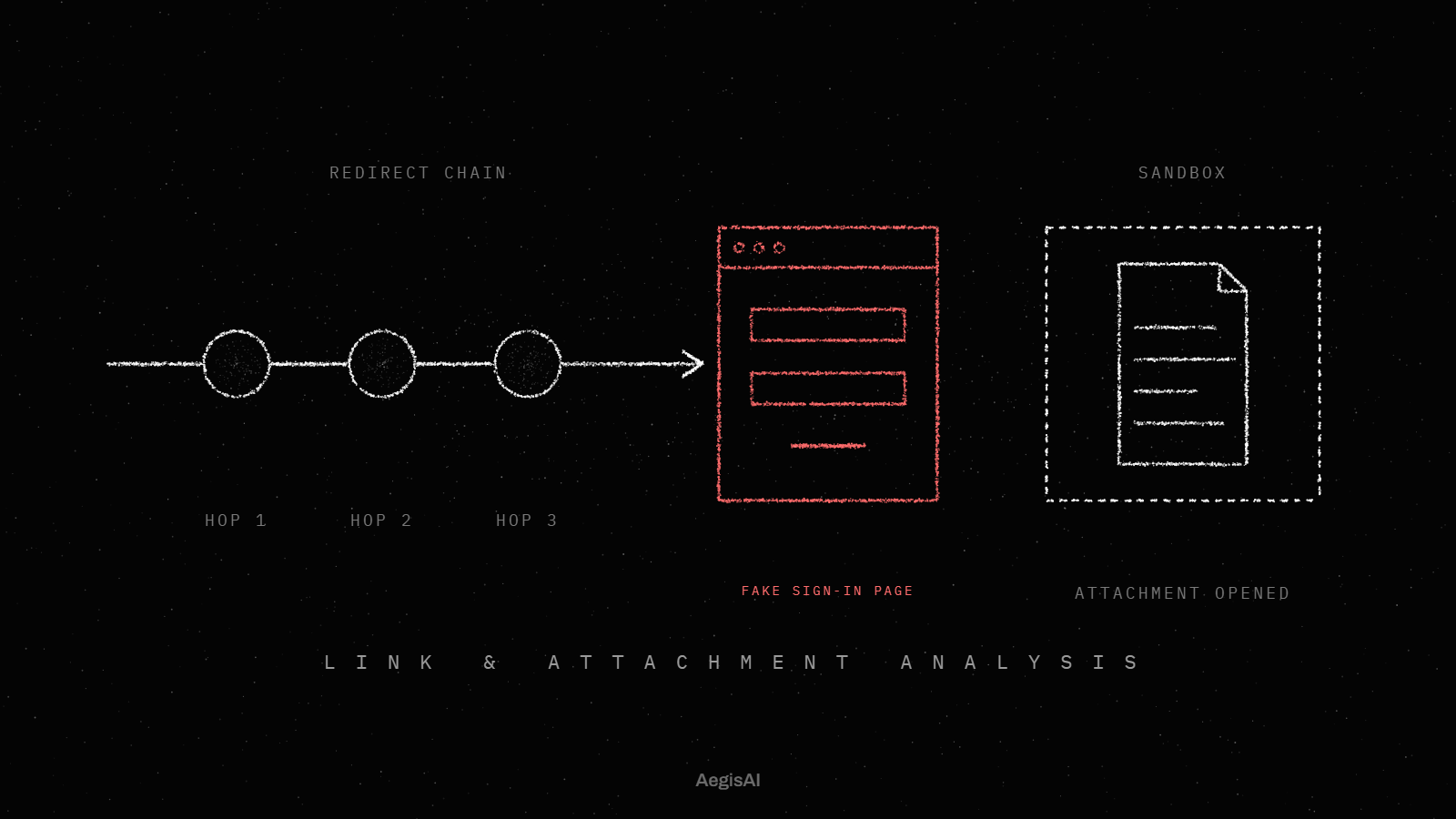
A link that redirects several times, or sits behind a CAPTCHA, defeats a scanner that stops at the first hop, as the write-up on how agents follow evasive links and attachments shows.
Ask the vendor: which fields does the agent read for every email, and which only when a user reports one?
In Microsoft's automated investigation, the Evidence tab lists each suspicious entity analyzed with its result. Each entity carries a verdict and a remediation status7. The triage agent documentation adds a natural language rationale with the reasoning and evidence used3.
Ask the vendor: show me the full evidence record for one malicious and one clean verdict from my trial.
AIR approves its own remediation for malicious URL and file clusters8. Soft deleting messages and turning off external forwarding wait for a member of the security operations team9, and a pending action times out after one week.
OWASP's guidance on excessive agency says the same in general terms: require a human to approve high-impact actions, and limit an agent's extensions to the minimum permissions needed17.
Ask the vendor: which actions run with no approval by default, and can I change that per threat type?
For a phishing verdict, AIR soft deletes the email or its cluster, and when more than a handful of related messages carry phishing, it treats the whole cluster as one attempt11. For a malicious URL caught by Safe Links, it also blocks the URL at time of click.
Zero-hour auto purge searches only the last 48 hours of delivered email, and users are not told when it moves a message13. In Google Workspace, the security investigation tool lets admins use Gmail log data to find and erase malicious emails or mark them as phishing14.
Ask the vendor: when one message is convicted, how do you find every copy of it, forwards included, and how far back do you search?
Microsoft's investigation playbook resolves submissions where no action is needed, which it says happens frequently with user reports15. The report button acts too: messages reported as phishing from Outlook are deleted16.
Ask for two shares from the trial: reports closed with no human touch, and reports escalated with a reason attached. With up to 30 minutes of manual work per alert, each report the agent closes correctly returns that time to the team.
Ask the vendor: in my trial, how many reports closed automatically, and what did the agent tell each person who reported one?
Grant read access first, prove the verdicts, then grant write access for removal. OWASP names minimum permissions as a control against excessive agency.
Get the details in writing: the exact API permissions requested, how to revoke them from your own admin console, and what happens to mail flow if the agent's service stops. The questions CISOs ask about trusting AI agents inside the inbox cover where the model runs and how agents resist prompt injection.
Ask the vendor: what does the agent do in monitoring mode, and what changes the day I grant write access?
| Criterion | API-based | Gateway | Built-in platform controls | Managed service |
|---|---|---|---|---|
| What it reads | Mail after delivery through the Microsoft 365 or Google Workspace API | Mail in transit, before delivery | Authentication checks and policy hits; payload reputation plus detonation | What the provider's tools read |
| Evidence per verdict | Depends on the product; ask for a plain language reason | A rule match or a score | Evidence tab with a verdict per entity | The analyst's write-up |
| Actions without approval | Set by policy per threat type | Block or quarantine before delivery | Malicious URL and file clusters | What the contract allows |
| Removal after delivery | Every mailbox, with write access through the API | Limited once delivered | Soft delete by cluster; 48 hour ZAP window | Done by the provider |
| User reports | Closed or escalated by the agent | A separate workflow | Playbook closes reports needing no action | The provider's queue |
| Access to revoke | API grant in your admin console | Mail flow and connectors | Part of the platform | Accounts and grants you give |
Does the agent read the email authentication results (SPF, DKIM, DMARC) in the Authentication-results header?
Does it follow every link to the end and open every attachment, archives included?
Does it read the sender's history with your organisation?
Does every verdict show its evidence and a reason in plain language?
Can you choose which actions run without approval, per threat type?
Does a person approve forwarding changes and account actions?
Does one conviction remove every copy, forwards included?
Does it close safe user reports and tell the reporter why?
Can it run read-only before you grant write access?
Can you revoke its access from your own admin console?
Illustrative example, figures are fictional. Northgate Clinics (fictional) has 900 staff on Microsoft 365 and a two-person security team. On a Tuesday, 41 staff receive the same "shared document" email, and 6 report it. In the trial, the agent follows the link through three redirects to a copy of a sign-in page. It convicts the message and removes all 41 copies plus 2 forwards. The evidence record shows a DMARC pass next to the sender's first contact with the organisation. The sign-in page sits on a domain registered the day before. A forwarding rule one recipient created waits for an analyst, who approves its removal. The 6 reporters get a note that the email was phishing.
An AI phishing investigation agent does the work of a first-line analyst on a suspicious email: it reads the message and checks the evidence, then reaches a verdict and acts. Microsoft's description of its own agent lists content analysis and detonation of files and URLs. It also uses screenshot analysis with threat intelligence tools.
Legacy email security matches each message against known signatures and sender reputation; agentic phishing triage investigates what each message asks the reader to do. The difference shows when a sender passes SPF, DKIM and DMARC, because the Authentication-results header then records a pass. For how this changes daily SOC work, read how autonomous email threat response reduces SOC workload.
Evaluate the capabilities in the checklist above, one criterion at a time. In 2025, the FBI's IC3 logged 191,561 phishing and spoofing complaints18 and $3,046,598,558 in business email compromise losses. A payment request with no link or file tests sender history and context, because there is nothing to detonate.
Measure ROI as analyst hours returned and time from delivery to removal. Each phishing alert takes up to 30 minutes of manual triage, so count the alerts the agent closes without a person and multiply by the minutes your team logs per alert. Then track mean time to remediate confirmed phishing, from first delivery to the last copy removed.
An MSP should check that every client tenant has its own permissions, its own approval rules and its own evidence log. Least privilege applies per tenant: an agent's extensions get only the permissions they need. Ask whether approval settings can differ between clients, and whether each client's verdict records export separately for that client's auditor.
Find the right agent by running the checklist above on a trial in your own tenant, read-only first. Score its verdicts on your own reported mail, read the evidence records, then decide which actions to allow without approval. The guide to reducing SOC time spent on phishing triage covers the reporting and grouping workflow around the agent.
AegisAI's agents investigate every inbound email for what it is trying to do, and remove the ones that fail from every mailbox they reached20. Specialist agents investigate different evidence: sender reputation, threat indicators, the link chain and the business context of the message25. Every verdict comes with its reason in plain language, so your team can check it and share it. Alerts give a summary, the warning signs found and a recommended next step. AegisAI runs in monitoring mode first, and removal needs write access your admin grants and can revoke.
You can run that trial on your own tenant through the demo page, after reading the inbound email security page.
The best ones pass three tests on your own mail. They read authentication, links, attachments and sender history. They show the evidence behind every verdict. They let you choose which removals run without a person. For comparison, Microsoft's AIR approves its own actions only for malicious URL and file clusters.
It can remove convicted messages from every mailbox and block URLs. It can also close safe user reports, if you allow it. Keep a person on high-impact actions such as forwarding and account changes, as OWASP's excessive agency guidance advises. In Microsoft 365, soft delete and forwarding changes wait for approval by default.
It closes routine reports and assembles the evidence. Analysts keep the approvals and the overturned verdicts. They also own the incidents that involve accounts or payments. With up to 30 minutes of manual triage per alert, the time saved goes to those cases.
The Authentication-results header records whether each email authentication check (SPF, DKIM, DMARC) passed. A pass confirms the sending domain and says nothing about the request inside. The agent must also weigh sender history and what the email asks the reader to do.
Start read-only and compare its verdicts on your own reported mail. Then grant write access for removal of high-confidence phishing only, and add actions one at a time. Keep permissions to the minimum the agent needs, and confirm you can revoke them from your own admin console.
When more than a handful of related messages carry phishing, Microsoft's AIR treats the cluster as one attempt and soft deletes it. Ask any vendor how it groups copies with their forwards, and how far back it searches, since zero-hour auto purge looks back 48 hours.