Google Workspace Email Security Without MX Changes
Deploy email security in Google Workspace without MX record changes. See how API-based protection runs alongside Gmail's native filters.
.png)
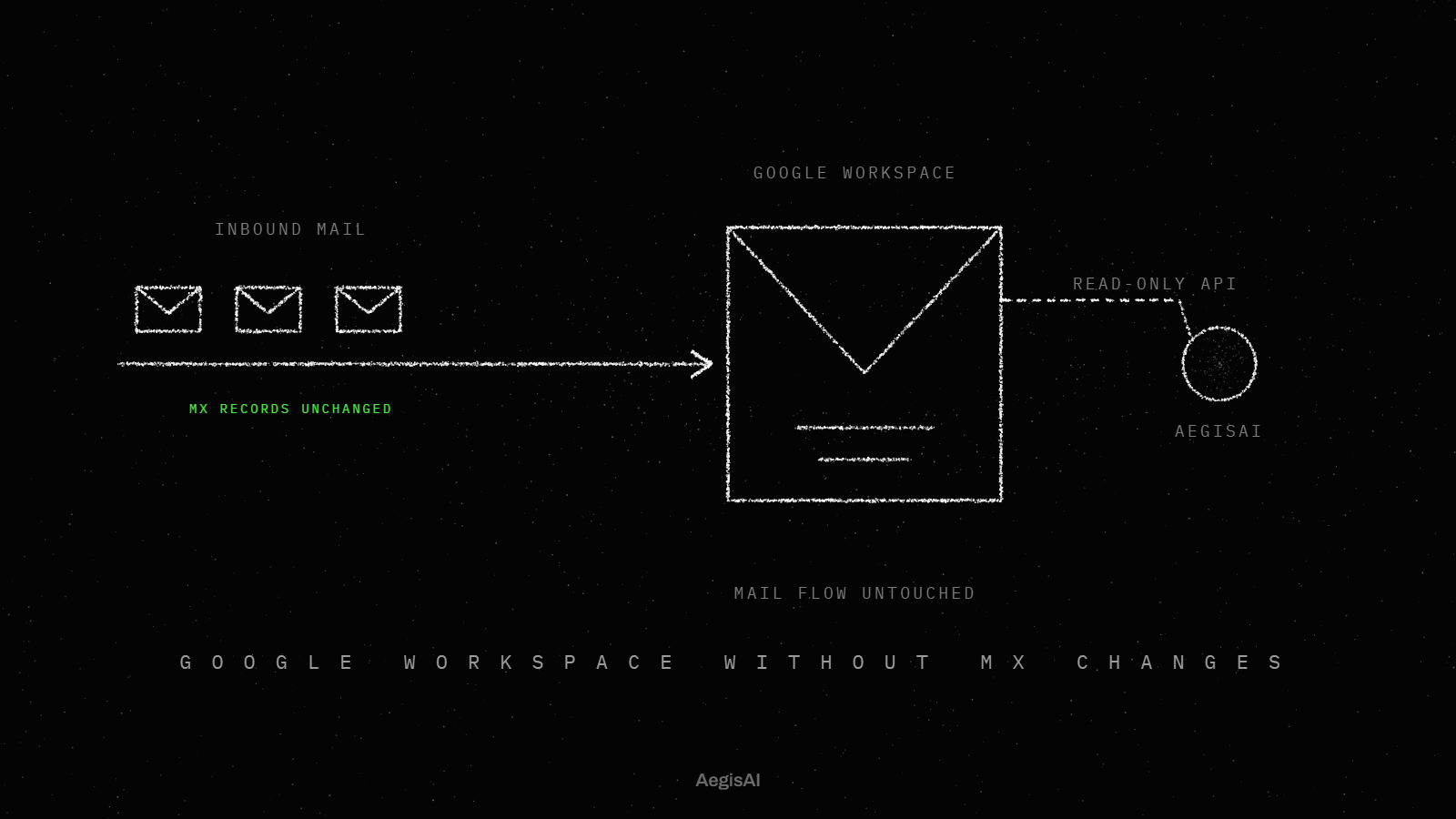
Yes, you can deploy email security in Google Workspace without changing MX records. API-based platforms connect directly to Google Workspace through OAuth, read mail that is already in the inbox, and analyze it for threats. Your MX records, mail routing, and existing Gmail filtering stay exactly as they are.
This matters because most security teams assume adding a layer of protection means touching mail flow. It does not have to.
Key takeaways
- API-based email security connects to Google Workspace through OAuth and a read-only API, without changing MX records or mail routing.
- Setup typically requires a super admin for authorization, a designated administrator, and an exclusion list for mailboxes that should not be scanned.
- Existing Gmail native filtering and any current security tools keep running unchanged during an API-based evaluation.
- Traditional MX record changes carry real operational risk, including delivery gaps, which Google's own documentation addresses directly.
- API-based deployment supports a monitor-before-enforcement model, so teams can see detection results before turning on quarantine or remediation actions.
Why do most email security tools require MX record changes?
Secure email gateways were built around a simple idea: put a filter in front of the inbox and route every message through it before delivery. To do that, the gateway becomes your mail exchanger, which means pointing MX records at the vendor instead of Google.
That model requires:
- DNS changes across every domain in scope
- TTL changes planned ahead of the cutover
- A cutover window where mail can bounce or misroute if something goes wrong
- Ongoing maintenance of the gateway as infrastructure
Google's own documentation on changing MX records recommends scheduling the change during low-volume periods and notifying key contacts in advance, because propagation can take up to 48 hours and some messages sent during that window can bounce and need to be resent. That is a real operational risk for a security evaluation, not just a production migration.
For a deeper comparison of this model against newer approaches, see our breakdown of secure email gateways versus modern alternatives.
What is API-based email security?
API-based email security connects to Google Workspace through its native APIs instead of sitting in the mail path. Rather than becoming the mail exchanger, the platform authenticates once, typically through OAuth, and then reads messages that have already arrived in mailboxes.
According to the report on one deployment, "AegisAI connects to Google Workspace through a read-only API and analyzes mail already sitting in inboxes." Nothing is rerouted. Nothing is intercepted in transit.
API-based platforms generally work this way: they connect to cloud email through REST APIs and scan inbound, outbound and internal mail without rerouting it or modifying MX records. Mail keeps flowing through Google, and the platform adds its analysis on top of Google's native controls.
How does deployment actually work?
What access does it require?
Setup is an identity and permissions exercise, not a network change. Per the report, Writer's own setup required "a super admin, an AegisAI administrator, and a list of addresses to exclude from scanning." That is the full access list: an admin account to authorize the API connection, a designated administrator on the vendor side, and an exclusion list for any mailboxes that should not be scanned, such as legal or HR accounts with compliance holds.
What happens during evaluation?
Once the API connection is authorized, the platform begins analyzing mail that is already flowing through Gmail, without changing how that mail arrives. The report is specific about what is not required: "No rules written, no thresholds tuned, no models retrained. No MX record changes, no mail rerouting, no appliance racked and no endpoint agent installed."
That means the evaluation period runs in parallel with your existing filtering. Google's native spam, phishing, and malware detection keeps operating exactly as it does today. Nothing is removed, replaced, or routed around.
The report also notes the practical outcome of this approach: "The evaluation required no commitment, no change to mail flow and no production risk." For a security team evaluating a new tool, that removes the main objection to running a pilot: the fear of breaking mail delivery.
API-based vs. MX record deployment: a comparison
| Factor | MX record deployment | API-based deployment |
|---|---|---|
| Setup time | Up to 48 hours of DNS propagation, per Google's documentation | OAuth authorization, with no DNS propagation wait |
| Mail flow impact | Mail reroutes through the vendor before delivery | Mail flow is untouched |
| Risk during setup | Possible bounces or delivery gaps during cutover | No change to production routing |
| Reversibility | Requires another DNS change to revert | Revoke API access to disconnect |
| Visibility | Pre-delivery only, at the perimeter | Pre- and post-delivery, inside the mailbox |
Can you monitor before you enforce?
A read-only API connection naturally supports a monitor-first approach. The platform can analyze mail, flag risk, and generate findings before any enforcement action, like quarantine or banner insertion, is turned on.
This matters for two reasons:
- Existing defenses keep running. Google's native filtering is not disabled or replaced during the evaluation. You are adding visibility, not removing a layer.
- You see real results before committing. Because nothing in mail flow changes, there is no rollback plan needed if the evaluation ends. You simply revoke access.
For teams specifically weighing whether a third-party layer makes sense on top of Gmail's built-in protections, our perspective on adding a third-party email security layer to Google Workspace covers how that layering decision typically plays out, and our guide on evaluating API-based email security walks through what to look for during a pilot.
Is API-based deployment right for every team?
API-based deployment fits teams that want to evaluate a new detection layer without a change window, without DNS risk, and without involving network or infrastructure teams in a security pilot. It is a reasonable default for most Google Workspace environments.
For business email compromise specifically, which often does not rely on payloads that a gateway can catch at the perimeter, see our breakdown of BEC protection approaches for Google Workspace.
FAQ
Does API-based email security replace Google Workspace's native filtering?
No. It runs alongside Google's native spam, phishing, and malware detection. Native filtering stays active and unchanged during and after deployment.
How long does an API-based deployment take to set up?
Based on the report, setup involves authorizing API access, assigning an administrator, and defining an exclusion list. This is a configuration task, with no DNS propagation window like the one that comes with an MX record cutover.
Will changing to an API-based tool affect current mail flow?
No. Because the connection is read-only and operates through the API rather than the mail path, there is no change to how mail is routed, delivered, or filtered at the transport level.
What access does my team need to grant?
Per the report, the minimum setup required a super admin account, a designated AegisAI administrator, and a list of addresses excluded from scanning.
Can I evaluate the tool before enforcing any blocking actions?
Yes. A read-only API connection allows the platform to analyze mail and surface findings before any enforcement, such as quarantine or banners, is enabled.
Next step
If you want to see what API-based monitoring surfaces in your own Google Workspace environment before changing anything in production, book a demo with AegisAI.
Related posts
More from the AegisAI blog.