AegisAI Perspectives · 054
Agentic AI is applied to email security as agents that investigate each email, read the thread and the sender history, then remove it or let it through.
Agentic AI is applied to email security as agents that investigate each message, read its thread and the sender's history, decide what it is trying to do, and act on that verdict15. AegisAI connects to Microsoft 365 or Google Workspace through the API, judges every message by its intent, and removes what fails from every mailbox it reached7. The FBI IC3 logged 24,768 business email compromise complaints in 2025, with $3,046,598,558 in reported losses51.
An admin decides how far the agent may act. It starts read-only, and removal needs write access that the admin grants and can revoke9.
Agentic AI in email security means agents built on large language models that reason, plan, decide and act on mail without a person driving each step. In practice the agent works on one message or one alert at a time. It classifies what it sees, explains its verdict in natural language and learns from analyst feedback. On an inbound mail platform, it investigates every message for what it is trying to do and removes the ones that fail from every mailbox they reached.
Agentic AI is applied to email security as a loop that runs on every message: read it, investigate it, decide, then act. The agent reads the thread the way an analyst would, with the sender's history, the change being asked for and where the reply actually goes. It connects to Microsoft 365 or Google Workspace through the API and judges each message by its intent.
The same loop runs on accounts. Agents read sign-ins and mailbox activity per account and raise one explained finding when behaviour stops matching the owner13.
This guide follows the loop in order. The next two sections cover what an agent is and how it investigates one email. Then come the use cases: phishing, reported mail, business email compromise, account takeover, removal, testing. After that, the agent is set against rules, gateways as well as playbooks. Later sections cover deployment and human control. Then come measurement and the attacks aimed at agents themselves.
AI helps at three points in a message's life: when it arrives, when a user reports it, and after delivery. At arrival, Safe Links in Microsoft 365 rewrites and scans URLs during mail flow and verifies them again at the time of click34. Basic anti-phishing adds spoof intelligence, the first contact safety tip and unauthenticated sender indicators35.
When a user reports a message, a triage agent uses large language model analysis to judge its intent and classify it as a real threat or a false positive. After delivery, an investigating agent removes a message that fails from every mailbox it reached.
The difference between these is who decides. Link scanning and safety tips are controls an admin sets in advance. A triage or investigating agent reaches its own verdict on each message and writes down why. For a walk through each stage, see how AI helps at each stage of a message.
Agentic AI in email security is a set of LLM-based agents that reason, plan, make decisions and take actions on mail without human intervention at each step. The definition comes from joint guidance that the Canadian Cyber Centre released with Australia's ACSC, CISA, the NSA and the New Zealand and UK national cyber security centres. Applied to mail, the agent does the work an analyst would do on one message.
Platform documentation shows the pattern. One triage agent operates autonomously, gives its rationale for each verdict in natural language, and learns from analyst feedback. An inbound mail agent investigates every message for what it is trying to do and removes the ones that fail from every mailbox they reached.
Three parts recur in each case: a verdict on one message, a reason a person can read, and an action that follows from both. A model that assigns a score and stops is a classifier. An agent carries the case through to the action and the record.
Generative AI writes content, while agentic AI reasons, plans, makes decisions and takes actions toward a goal. In email, attackers use the first kind to write lures. In one study, fully AI-automated spear phishing emails reached a 54% click-through rate, against 12% for a control group of arbitrary phishing emails71.
An agent on the defending side does a different job. A triage agent reads a reported email to determine its intent, then classifies it as a real threat or a false positive. It then gives the rationale for its verdict in natural language.
Both use large language models. The generative use ends with a piece of text. The agentic use ends with a decision on a real message, an action where the admin allows one, and a record of why17.
The agentic loop is the cycle an agent runs on each message: perceive the evidence, reason about it, plan a response, act on it, then learn from the result. In email, perceive means reading the message in full. Reputation, intent, policy and headers are checked in parallel, and links and attachments are opened in a sandbox8. Reason and plan are the steps the joint guidance names when it defines agentic systems as agents that reason, plan and make decisions.
Act means a change to the mailbox. With enforcement on, confirmed threats are removed from every mailbox they reached, and each action is logged with its reasoning. In monitoring mode the same agent records verdicts without acting.
Learn means the agent takes in analyst corrections. One platform's triage agent is documented as learning from analyst feedback. Each turn of the loop leaves a verdict, a reason and, where the admin allows it, an action on record.
Email security needed agents because phishing is still the main way in and much of it passes authentication. Phishing accounted for approximately 60% of intrusion cases in the ENISA Threat Landscape 202564. The FBI IC3 received 24,768 business email compromise complaints in 2025. Authentication does not separate honest senders from the rest, because any domain owner, even a bad actor, can publish an SPF record and obtain a pass.
AI also changed the attacker's costs. AI-automated spear phishing reached a 54% click-through rate in one study. The same study found AI lets attackers raise phishing profitability by up to 50 times for larger audiences72.
Fixed markers such as spoof intelligence and unauthenticated sender indicators have little to flag on a model-written lure from a domain that passes SPF. An agent reads each message for what it is trying to do, and checks the request against what the sender has sent before4.
An agent investigates one email by checking reputation, intent, policy and headers in parallel and opening its links and attachments in a sandbox. It then reads the thread the way an analyst would: the sender's history, the change being asked for, and where the reply actually goes. The table lists each signal and what it tells the agent.
| Signal | What the agent reads | What it tells the agent | Source |
|---|---|---|---|
| Authentication headers | SPF, DKIM and DMARC results for the sending domain | Whether the domain authorised the send. A pass alone proves little, since any domain owner can pass SPF | 43, |
| Sender history | What this sender has sent before | Whether the request fits the sender's past mail, which carries the verdict when a real vendor account is compromised | 6 |
| Thread | The earlier messages, the change asked for, the reply address | Whether the conversation is being redirected to a new payee or address | |
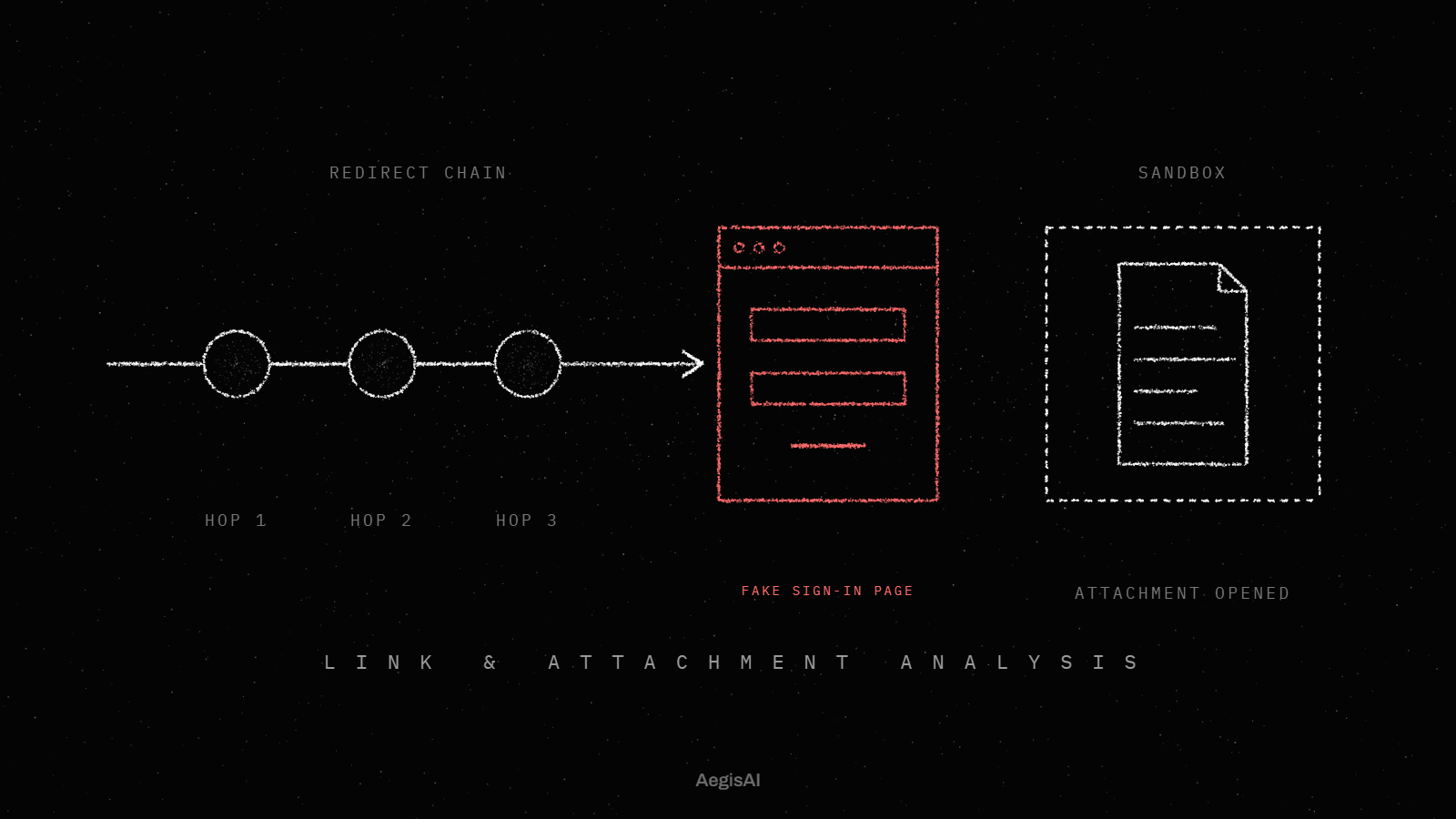
| Links, files and QR codes | Each one opened in a sandbox and followed to the end | What the destination does. A gate such as a CAPTCHA counts as evidence | 10,12 |
| Intent and request | What the message is trying to do, checked with reputation, policy and headers | The core of the verdict, which decides removal | |
| Account behaviour | Sign-ins and mailbox activity per account | Whether the account sending the mail still behaves like its owner | ,14 |
An agent looks at reputation, intent, policy and headers together, and opens every link and attachment in a sandbox. Those checks run in parallel on the same message. The agent then reads the thread like an analyst would: who the sender is by history, what change the message asks for, and where a reply would actually go.
The point of reading this much is a verdict on intent. On an API-based platform, every message is judged by what it is trying to do, and what fails is removed from every mailbox it reached. A message with a clean domain and a clean link still fails when its payment request does not match the sender's history.
The table above lists each signal and what it tells the agent. The next sections take the hardest ones in turn: thread and sender history, links and files, authentication passes, timing, as well as messages with no link or attachment at all.
An agent uses thread and sender history to judge whether a request fits what this sender has done before. AegisAI reads the thread the way an analyst would: the sender's history, the change being asked for, and where the reply actually goes. That history carries the case when a vendor's real account is compromised. Authentication passes, so the verdict rests on what this sender has sent before and on the request itself.
Payment requests get the closest check. Agents check every payment request against the sender's history, and stop the business email compromise that authentication lets through. A first request to pay a new account, from a sender whose past mail never mentioned payment, stands out against that history. So does a reply address that differs from the one the thread used before.
Thread history also covers a hijacked conversation, where an attacker replies inside a real thread. The earlier messages are genuine. The test then falls on the change being asked for and where the reply goes.
An agent opens every link, file or QR code in a sandbox, follows each one to the end, and judges what it finds there. Some destinations sit behind a gate such as a CAPTCHA. Gates are hard for any automated system, so one approach treats the gate itself as evidence and never scores a hidden page clean.
Built-in platform controls work at other points. Safe Links in Microsoft 365 scans URLs during mail flow and verifies them again at the time of click. Gmail Security Sandbox scans attachments in a virtual environment and can delay delivery by up to 3 minutes42.
QR codes need their own handling, because the link sits inside an image. APWG reports that criminals send millions of emails a day containing QR codes74. A scan on a phone moves the click to a mobile device, and the 2026 DBIR reports higher click rates on mobile devices53. For the full method, see how evasive links and attachments are investigated.
An agent treats authentication passes (SPF, DKIM, DMARC) as one input and keeps investigating the request and the sender's history. NIST recommends these three as the mechanisms for authenticating a sending domain. A pass shows the domain allowed the send. It does not show the sender is honest, because any domain owner, even a bad actor, can publish an SPF record for its own domain and pass.
Two cases pass cleanly. An attacker registers a domain of its own and sets up authentication on it. Or an attacker takes over a real vendor account, and every check passes because the mail really comes from that vendor. In both, the header check is green.
The verdict then rests on what this sender has sent before and on the request itself. The agent reads the change being asked for and where the reply actually goes. For the full mechanism behind these attacks, see why DMARC-passing phishing gets through.
On one API-based platform, an agent reaches a verdict in 1.9 seconds at the median and removes a convicted message within seconds11. That investigation happens after delivery, because the platform reads mail through the API. The timeline for one email has three marks: arrival in the mailbox, the verdict, then removal from every mailbox it reached.
Other controls run on different clocks. An inline sandbox adds time before delivery. Gmail Security Sandbox can delay delivery by up to 3 minutes while it scans attachments. Retroactive removal has a window after delivery. Zero-hour auto purge in Microsoft 365 searches only the last 48 hours of delivered email.
To map your own timeline, write down four times for one message: delivered, verdict, removal started, removal finished in the last mailbox. A malicious verdict with no removal time means the agent is in monitoring mode, where it records verdicts without acting.
Every verdict needs a plain language reason because the security team has to check it and share it2. A reason turns a verdict into something an analyst can test. If the agent marks a report as a false positive, the analyst reads why and decides whether to agree. Platform triage agents follow the same pattern: each verdict comes with its rationale in natural language, and the agent learns from analyst feedback.
Reasons also keep people reviewing. In a randomized controlled trial of one platform's own triage agent, analysts working with it spent 53% more time on malicious emails and were not prone to rubber-stamping its malicious verdicts70.
The reason is also the record. When a message is removed, the log says what the agent saw and why it acted. With enforcement on, each action is logged with its reasoning. That log is what an incident review reads later.
An agent handles an email with no link or attachment by judging the request against the sender's history. These messages have nothing to detonate. A business email compromise lure asks for a payment or a reply, and the text is the attack. Agents check every payment request against the sender's history and stop the compromise that authentication lets through.
When the sender is a real vendor whose account was taken over, authentication passes. The verdict then rests on what this sender has sent before and on the request itself. The thread adds the rest: the change being asked for and where the reply actually goes.
Models now write some of these requests. In 2025, businesses reported losses over $30 million to business email compromise scams involving AI52. For how rules and AI compare on this attack, see AI or rules for payloadless BEC.
The practical use cases for agentic AI in email security are triage of reported mail, business email compromise, account takeover, phishing detection, removal, as well as testing. Each is a job an analyst did by hand: read a message or an account, decide, act, and write down why. The sections below take each use case with the platform features and evidence behind it.
Agentic AI detects sophisticated phishing by investigating what each message is trying to do. The pressure comes from volume and quality. APWG observed 1,003,924 phishing attacks in the first quarter of 2025, the largest number since late 202373. AI-automated spear phishing reached a 54% click-through rate in one study, against 12% for arbitrary phishing emails.
The attack surface is wider than the inbox. MITRE ATT&CK describes phishing as electronically delivered social engineering, including messages sent through third-party services or calendar invites75. A well written lure from a domain that passes SPF gives a fixed filter little to match.
An agent investigates the parts a lure needs in order to work. It opens every link, file or QR code in a sandbox and follows each one to the end. It checks reputation, intent, policy and headers in parallel. The verdict rests on intent, and what fails is removed from every mailbox it reached.
Agentic AI triages user-reported emails by reading each report, judging its intent, then classifying it as a real threat or a false positive. A false alarm is classified as a False Positive and resolved. A malicious report is classified as a True Positive, and the incident stays open for an analyst22. The agent clears the noise and hands the real cases to people.
There is evidence on the effect, from a trial of the platform's own agent. In a randomized controlled trial of one platform's phishing triage agent, analysts with the agent achieved up to 6.5 times as many true positives per analyst minute and a 77% improvement in verdict accuracy. The study evaluates that vendor's own agent, so read it as a result for that product and setup.
The same trial checked for blind acceptance. Analysts with the agent spent 53% more time on malicious emails and were not prone to rubber-stamping its malicious verdicts. Each verdict also comes with its rationale in natural language, which is what the analyst reviews.
An agent helps stop business email compromise by checking every payment request against the sender's history. The scale is large. The FBI IC3 received 24,768 complaints in 2025, with $3,046,598,558 in reported losses. APWG reports that wire transfer BEC attacks rose 33 percent in the first quarter of 2025 over the previous quarter.
Authentication does not settle these cases. When a vendor's real account is compromised, authentication passes, so the verdict rests on what this sender has sent before and on the request itself. The agent reads the thread the way an analyst would, with the sender's history, the change being asked for and where the reply actually goes.
A request to pay a new account, or a reply address that leaves the thread, is weighed against everything this sender has sent before. AI is part of the attack too. In 2025, businesses reported losses over $30 million to business email compromise scams involving AI.
An agent finds a compromised account by reading sign-ins and mailbox activity per account and raising one explained finding when behaviour stops matching the owner. The signals are impossible travel, new devices, inbox rule changes, suspicious internal sends, weighed together per account.
Inbox rules matter because attackers use them to hide. MITRE ATT&CK documents adversaries using inbox rules in a compromised mailbox to move or delete emails, hiding security alerts or replies to phishing sent from that account76. The agent weighs the signals together, so a rule that deletes replies, set after a sign-in from a new device, reads as one finding.
The action after the finding stays with people on at least one platform. Its agents do not revoke sessions today: every finding comes with recommended steps, and the team acts in its identity provider15. Plan for the finding to reach whoever runs that provider. For the attack sequence, see how email account takeover works.
An agent removes a malicious email by finding every copy that was delivered and pulling each one from the mailbox it reached. The removal runs through each platform's own tools. In Microsoft 365, zero-hour auto purge retroactively detects and neutralizes phishing, spam or malware messages already delivered to cloud mailboxes29. Its search covers only the last 48 hours of delivered email.
An app can also move mail itself. Through Microsoft Graph, moving a message creates a new copy in the destination folder and removes the original32.
In Google Workspace, admins use Gmail log data in the security investigation tool to find and erase malicious emails, or mark them as spam or phishing36. An app with the gmail.modify scope calls users.messages.trash, which moves the message to the trash41. On an API-based platform with enforcement on, each removal is logged with its reasoning.
Agentic AI tests employees with simulations built from real attacks and from research on each person. One approach replays phishing caught in the tenant to the people it targeted, and separates human clicks from scanner clicks19. Another uses an AI agent to research each person and write a lure for them, and nothing runs until the security team approves it20.
The reason to simulate with AI is that attackers already write with it. AI-automated spear phishing reached a 54% click-through rate in one study, against 12% for a control group of arbitrary phishing emails. A test built from real lures measures staff against the attacks they actually receive.
Separating scanner clicks keeps the numbers honest. Link scanners such as Safe Links scan URLs in inbound mail, and a scan counted as a click inflates the failure rate. For how this works in practice, see phishing simulation built from real attacks.
Agentic AI cuts SOC time on phishing triage by resolving false alarms itself and passing true threats to analysts. The time saved comes from the reports that turn out to be harmless. Those close with a verdict and a reason, and analysts spend their minutes on the incidents that stay open.
The main evidence is a trial of the platform's own agent. In a randomized controlled trial of one platform's phishing triage agent, analysts with it achieved up to 6.5 times as many true positives per analyst minute. They also spent 53% more time on malicious emails. The second figure shows time moving from noise to real threats.
Read both figures as one vendor's result for its own product. To know what changes in your own SOC, time a week of your queue before the agent and a week after, and count analyst minutes per true positive. For the method, see how to reduce SOC time on phishing triage.
Automate it by letting the agent close false positives on its own and keeping every true positive open for an analyst. That rule stops the flood. Each harmless report ends as a resolved alert with a reason, and only the malicious ones become work for a person.
Scope the agent's access before you switch it on. One platform's triage agent identity needs Alerts (manage) and a read permission limited to emails associated with alerts, rather than all emails23. That keeps the agent inside the queue it works.
Keep removal behind approval at the start. When automated investigation and response identifies threats, it queues remediation actions for security operations staff to approve27. The agent decides on the report, and a person approves any action on mailboxes. Write that split down for every action, with the record each one leaves. That list is the start of the approval table later in this guide.
Agentic AI differs from traditional email security because it investigates each message across reputation, intent, policy, headers and sandboxed links at once, and keeps working on mail after delivery. Built-in controls such as zero-hour auto purge also revisit delivered mail. The table compares the approaches by criterion.
| Criterion | Rule-based filter | Inline mail-path scanning | SOAR playbook | One-time ML score | Investigating agent |
|---|---|---|---|---|---|
| When it acts | During mail flow, when a set condition matches the sender | Before delivery, in the mail path; an attachment sandbox can delay delivery up to 3 minutes | After an alert, in steps written in advance | Once, at arrival | After delivery, on every message, with removal from every mailbox reached |
| What it reads | Spoof intelligence, first contact and unauthenticated sender indicators | URLs rewritten and scanned in mail flow, checked again at click | The alert and the fields the playbook names | Features of one message at one moment | Reputation, intent, policy, headers, sandboxed links and files, thread and sender history |
| Revisits delivered mail | No | Links again at the time of click | When a new alert fires | No | Yes; built-in purge also revisits within 48 hours |
| Who approves action | The admin, when writing the rule | The admin, through policy | Security operations staff approve queued remediation | The admin, through the threshold | Monitoring mode records only; enforcement is switched on by the admin |
| Evidence it leaves | The rule that matched | The policy that fired | The investigation and its action queue | A score | A verdict with a plain language reason and each action logged with its reasoning |
An AI agent judges each message by what it is trying to do. A rule-based filter acts only when a set condition matches. Rules check fixed properties of a sender. Basic anti-phishing in Microsoft 365 includes spoof intelligence, the first contact safety tip and unauthenticated sender indicators.
The gap is the message with no bad property. Any domain owner, even a bad actor, can publish an SPF record and pass. AI-written spear phishing reached a 54% click-through rate in one study, and its text carries no keyword a rule waits for. An agent reads the request along with the thread and the sender's history, so its verdict does not wait on an attacker's mistake.
The two layers work together. Spoof and first contact checks keep running in Microsoft 365. The agent adds a verdict on intent for the mail those checks let through. For a side by side of both methods, see AI email security compared with rule-based detection.
A SOAR playbook runs steps written in advance, while an agent reasons about each case and explains its verdict. Automated investigation and response in Microsoft 365 shows the playbook side. When it identifies threats, it queues remediation actions for security operations staff to approve. The steps are fixed, and a person approves the result.
An agent decides inside the case. A triage agent operates autonomously, gives its rationale for each verdict in natural language, and learns from analyst feedback. When the evidence in a new case differs from the last one, the agent's reasoning follows the evidence. A playbook changes only when someone edits it.
The two fit together. The agent reaches a verdict and writes the reason, and an approval queue carries out the action an admin has allowed. Joint guidance from national cyber agencies advises starting with low-risk tasks. In practice that means keeping the approval step at first and lifting it only for low-risk actions once the verdicts hold up.
An agent keeps working on a message after delivery, while a one-time score is set at arrival and stays fixed. A score that misses at delivery leaves the message in the inbox. Platforms have retroactive tools for that case: zero-hour auto purge detects and neutralizes malicious messages already delivered to cloud mailboxes. One platform also runs an always-on backend service that looks for false negatives by correlating alerts, events, anomalies and threat intelligence26.
An agent's investigation covers more than one model's features. It checks reputation, intent, policy and headers in parallel and opens links and attachments in a sandbox. Then it acts and records why.
The practical test is what happens an hour later. A one-time score set at arrival does not change after it. An agent that convicts a message after delivery removes it from every mailbox it reached.
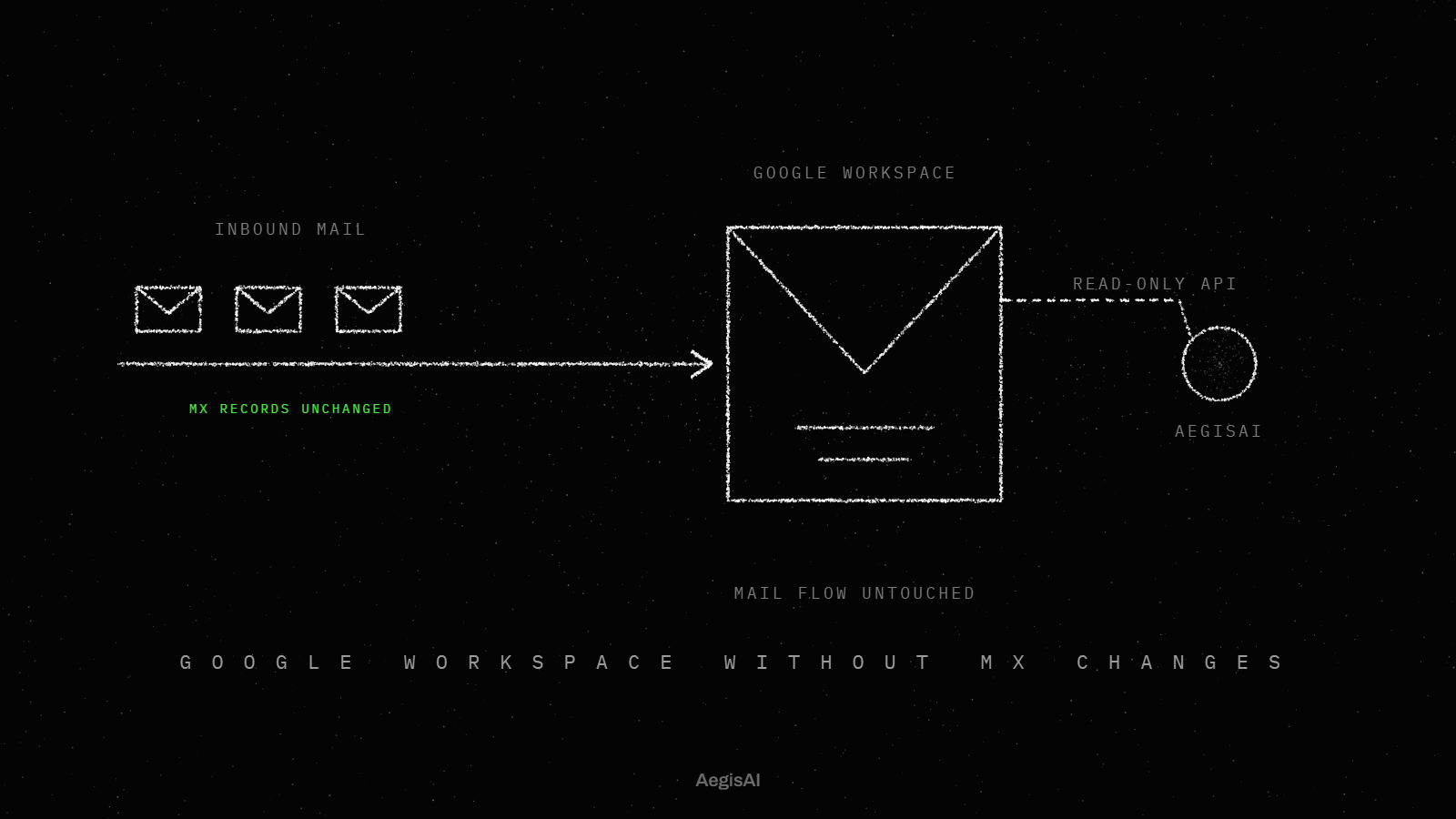
Yes. An API-based agent sits outside the delivery path, so it runs next to a gateway without changing how mail flows16. It connects through the Microsoft 365 or Google Workspace API with an OAuth grant the admin controls and can revoke. The gateway keeps scanning in the mail path, and the agent investigates what was delivered.
With nothing in the delivery path, an outage on the agent side leaves mail alone. On one API-based platform, if the service has an outage, mail keeps flowing while detection pauses until the service returns3. Inline link scanning such as Safe Links keeps working during mail flow and at click time.
This also sets the rollout order. The agent starts read-only in monitoring mode and records verdicts without acting, and removal needs write access the admin grants. Running next to the gateway lets a team compare what each layer catches before it changes anything. The deployment section of this guide covers each stage and the permission it needs on each platform.
An agent connected through the API sees the mailbox after delivery, including the thread as well as the account's behaviour. With the appropriate delegated or application mail permissions, an app can access the mail data of any user in a tenant31. That access lets the agent read the thread with the sender's history, the change being asked for, and where the reply actually goes.
It also sees accounts. Agents read sign-ins and mailbox activity per account and raise one explained finding when behaviour stops matching the owner. Suspicious internal sends and inbox rule changes are among the signals weighed. An inbox rule that hides replies lives in the mailbox settings, where attackers set it to move or delete mail.
A gateway reads each message as it passes through the mail path. The agent reads the history around the message and the account that sent it. For why gateways miss these cases, see why a secure email gateway misses phishing.
An API-based agent is deployed through each platform's own API, with an OAuth grant the admin controls and can revoke, and nothing in the delivery path16. The investigation and the verdicts then work the same way on both platforms18. The rollout runs in three stages, and each stage needs a wider permission than the one before.
| Stage | Microsoft 365 permission | Google Workspace scope | What the agent does |
|---|---|---|---|
| Read-only | Application mail permissions in Microsoft Graph, granted through tenant-wide admin consent3133 | gmail.readonly, which lets an app view messages and settings39 | Reads and investigates mail; removal stays off until write access is granted |
| Monitoring | The same read permissions | gmail.readonly | Records a verdict on every message without acting on any17 |
| Enforcement | Write access the admin grants and can revoke; a Graph move copies the message to the destination folder and removes the original32 | gmail.modify, the scope users.messages.trash accepts to move a message to the trash4041 | Removes confirmed threats from every mailbox they reached and logs each action with its reasoning |
An API-based agent connects through the platform's own API, with an OAuth grant that the admin controls and can revoke. On Microsoft 365 that API is Microsoft Graph. With the appropriate delegated or application mail permissions, an app reaches the mail data of the signed-in user or of any user in the tenant. An agent that protects every mailbox needs the application form, because the delegated form stops at one signed-in user.
On Google Workspace, the agent asks for Gmail API scopes, and the admin sets each third-party app's access to Trusted, Limited, Specific Google data or Blocked38. Because each platform has its own API, one design runs the same investigation and the same verdicts on both. Before you grant anything, list the mailboxes in scope and name the admin who owns the grant. Setup steps for each platform are in cloud email security on Microsoft 365 and Google Workspace.
No. An API-based agent reads mail through the Microsoft 365 or Google Workspace API, so there is no MX change and nothing in the delivery path. Mail keeps its current route, and the agent works on messages after the platform delivers them.
That moves the time cost. Inline scanning holds a message before the user sees it. Gmail Security Sandbox, which scans attachments in a virtual environment, can delay delivery by up to 3 minutes42. An agent that reads after delivery adds no hold of that kind. It has to remove a convicted message from every mailbox it reached instead, so the exposure is the window between delivery and removal. Measure that window on your own tenant during the read-only stage, per message, from arrival. The trade in detail: API-based email security with no MX record change.
It needs read access to investigate and write access to remove, and each is a separate grant. On Microsoft 365, tenant-wide admin consent gives an application its requested permissions for the whole organisation. Microsoft calls it a sensitive operation that can include full access to all mailboxes. On Google Workspace, gmail.readonly lets an app view messages and settings. gmail.modify adds reading, composing and sending, but does not allow immediate, permanent deletion that bypasses the trash.
Narrower designs exist. Microsoft's Phishing Triage Agent needs Alerts (manage) and a read permission limited to emails associated with alerts, rather than all emails23. On Google Workspace, admins can also restrict access to high-risk OAuth scopes. Ask every agent for its exact permission list, grant the read permissions first, and hold the write permission until monitoring is done.
Monitoring mode is the stage where the agent records a verdict on every message and takes no action. In one API-based design, the agent starts read-only in monitoring mode, and removal needs write access that admins grant or revoke. The team gets a record of what the agent would have done, on its own mail, before the agent can touch a mailbox.
National cyber agencies give the same order for any agent: start small, use agents only for low-risk tasks, and apply established security controls from the outset. Recording verdicts is a low-risk task. Removing messages from every mailbox is a high-risk one. Run monitoring long enough to cover your normal traffic, including month-end invoices and vendor threads. Then read the agent's verdicts against what your analysts decided, and turn on enforcement only when the remaining gap is one you accept.
Mail keeps flowing, and detection pauses until the service returns3. That follows from where the agent sits. An API-based agent has nothing in the delivery path, so the platform delivers mail whether the agent is up or down.
The risk moves from a mail outage to a detection gap. Messages that arrive during the pause reach inboxes without the agent's verdict. Keep the platform's own protection switched on for that window. Basic anti-phishing for all Microsoft 365 cloud mailboxes includes spoof intelligence, the first contact safety tip and unauthenticated sender indicators35. Zero-hour auto purge acts on phishing, spam or malware already delivered to cloud mailboxes29, within the last 48 hours of delivered email. Ask each vendor whether the agent investigates the mail that arrived during an outage, then check one outage record to confirm it did.
A read-only evaluation connects the agent with read access, records its verdicts without acting, and compares them with what your team decided. It runs in three steps.
First, grant read permissions only: gmail.readonly on Google Workspace, or application mail permissions in Microsoft Graph on Microsoft 365. Confirm the agent sees every mailbox in scope. Second, run monitoring mode, then export the verdicts with their reasons. Each verdict in one design comes with its reason in plain language, so the team can check it and share it2. Third, put the agent's verdicts beside your analysts' calls and count the disagreements in both directions: threats the agent caught that the team missed, and legitimate mail the agent would have removed.
Set the length of the run by your own mail cycle, long enough to include the invoices and vendor threads you see each month. The joint guidance supports the order, low-risk tasks first and controls from the outset. Use how to structure a read-only email security PoC as the plan.
You keep a person in control by deciding in advance which actions the agent takes alone, which wait for approval, and what record each one leaves. National cyber agencies state why: a system can take an action, but humans remain accountable for the decision to deploy it, the access it was granted, its safeguards and its consequences59. OWASP lists least privilege, human approval for high-risk actions and segregating external content among its prompt injection mitigations55. The table sorts common email actions by who decides and what record each leaves.
| Action | Who decides | Record left |
|---|---|---|
| Classify a user-reported email | The agent alone | The verdict with its rationale in natural language |
| Close a false positive | The agent alone, which resolves the alert22 | The agent's verdict text |
| Handle a true positive | An analyst; the incident stays open | The open incident |
| Remove a message from every mailbox | Staff approval when remediation is queued27; the agent alone once an admin turns enforcement on | The agent's action log with reasoning; the audit log that automated investigation requires28; Admin log event data for removals in the Google Workspace investigation tool37 |
| Revoke a session | A person, in the identity provider15 | The finding and its recommended steps |
| Send a simulation or red team lure | The security team; nothing runs until it approves20 | The approved run |
| Change a permission | An admin, through consent the admin can revoke | The OAuth grant itself |
Yes, to the extent you can check each verdict and limit each action. The limit matters because of how language models work. The NCSC explains that an LLM makes no distinction between data and instructions, so prompt injection attacks may never be totally mitigated in the way SQL injection attacks can be56. An email agent reads attacker-written text all day.
Trust therefore rests on two things you control. Each verdict comes with its reason in plain language, so the team can check it and share it. Accountability stays with people, who answer for the deployment, the access, the safeguards as well as the consequences. Turn both into settings. Grant the narrowest access that does the job, read the reasons during monitoring, and keep removal behind write access an admin grants and can revoke. The longer answer: can I trust AI agents inside my inbox.
An agent takes low-risk, routine steps alone, and a person approves high-risk ones. OWASP names human approval for high-risk actions as a prompt injection mitigation. Platform tools draw the line in a similar place. Microsoft's Phishing Triage Agent resolves a report it classifies as a false positive, and leaves a true positive open for an analyst. Automated investigation and response queues remediation actions for security operations staff to approve. In one API-based design, the agent does not revoke sessions at all: every account finding comes with recommended steps, and the team acts in its identity provider.
Use that pattern as the starting rule. Recording a verdict and closing a false report sit with the agent. Removal from every mailbox runs on the agent's own authority only after the team has read its verdicts in monitoring mode and turned enforcement on. Account actions such as session revocation stay with a person.
Analysts give feedback by confirming or overturning each verdict, and the agent learns from those corrections. Microsoft's Security Alert Triage Agent gives its rationale for each verdict in natural language and learns from analyst feedback. The rationale makes the feedback specific: an analyst who reads why the agent decided can say which signal it misread.
Feedback also depends on analysts not deferring to the agent. A trial of the platform's own triage agent found that analysts working with it spent 53% more time on malicious emails and were not prone to rubber-stamping its malicious verdicts70. Build the same habit. Require a one-line written reason for every overturned verdict, review the overturned verdicts each week, and track whether the same mistake returns. A mistake that keeps returning means the feedback is not reaching the agent. The full loop of detection, explanation and action: detect, explain, act.
Every action should leave a record of what the agent did, to which message, and why. With enforcement on, one API-based design removes confirmed threats from every mailbox they reached and logs each action with its reasoning. The platforms keep their own records. Automated investigation and response in Defender for Office 365 Plan 2 requires audit logging, which is on by default. On Google Workspace, administrator queries and actions in the security investigation tool are recorded in Admin log event data.
Keep both sets. The agent's log explains the decision, and the platform log shows the action took place. NIST SP 800-61 Rev. 3 ties incident response to the NIST Cybersecurity Framework 2.049, so file these records where your incident response process already looks for evidence. Test the trail once before enforcement. Pick one removed message and rebuild its path from arrival to removal using only the logs.
Give the agent the minimum access it needs for the shortest time, avoid long-lived credentials, and monitor what it does60. Scope is the first control. Microsoft's Phishing Triage Agent reads only emails associated with alerts, rather than all emails. An agent that protects every mailbox needs more, which makes the grant the decision to review: tenant-wide admin consent can include full access to all mailboxes.
On Google Workspace, set the app to Limited or Specific Google data where that covers the job, and restrict high-risk OAuth scopes for every other app. The joint guidance adds a layered defence and strict access controls to reduce the likelihood that an agentic AI system is compromised63. Write down which scopes the agent holds, who granted them and when they were last reviewed. Then put the next review on the calendar.
The agent closes reports it classifies as false positives and sends reports it classifies as threats to a human. That is how Microsoft's Phishing Triage Agent works: a false alarm is classified as a False Positive and resolved, and a malicious report becomes a True Positive whose incident stays open for an analyst. The split puts analyst time on the reports that hold real threats. In a randomized controlled trial of the platform's own agent, analysts using it found up to 6.5 times as many true positives per analyst minute, with a 77% improvement in verdict accuracy.
Two checks keep the rule safe. Each week, have an analyst read a sample of the auto-closed reports, because a closed report is the one nobody opens again. Track how many auto-closed messages a user reports a second time, and treat a rise as a sign the agent is closing threats.
You measure an email agent by analyst time per real threat, by time from arrival to removal, and by its mistakes in both directions. A trial of the platform's own triage agent measured analyst time, and found up to 6.5 times as many true positives per analyst minute with the agent. One API-based design publishes its timing, a verdict in 1.9 seconds at the median and removal of a convicted message within seconds11. Count cost in licences and analyst minutes, because no neutral price per email exists in the sources behind this guide.
Measure whether analysts find more real threats per minute, and decide more of them correctly, with the agent than without it. That is what the randomized controlled trial of the platform's own Phishing Triage Agent measured. It reported up to 6.5 times as many true positives per analyst minute and a 77% improvement in verdict accuracy. It also checked behaviour: analysts with the agent spent 53% more time on malicious emails and did not rubber-stamp its malicious verdicts.
Copy those measures on your own queue. Over the same weeks, compare reports handled with the agent's verdict against reports handled without it, and count true positives found per analyst minute and the share of verdicts an analyst later overturned. Report the results in the incident response terms the team already uses, under NIST SP 800-61 Rev. 3. Definitions for time to detect and time to respond: email security metrics, MTTD and MTTR.
A good time is one you measure per message from arrival, and report as a median with its slowest cases. One API-based design reports a verdict in 1.9 seconds at the median and removal of a convicted message within seconds, after delivery. Platform timings give the outer bounds. Gmail Security Sandbox can delay delivery by up to 3 minutes while it scans attachments. In Microsoft 365, the zero-hour auto purge search is limited to the last 48 hours of delivered email, and users are not notified when it moves a message. A message still waiting for removal after that window falls outside the search.
Pull the timestamps from the agent's action log and, on Google Workspace, from Admin log event data. The median shows normal operation. The slowest cases show where a message sat in an inbox long enough to be opened, and each one deserves a line in the weekly review.
Count two errors, each as a share of all messages processed: legitimate mail the agent removed, and threats it closed as harmless. The triage queue shows the second. Microsoft's Phishing Triage Agent resolves the reports it calls false positives and leaves true positives open, so an analyst sample of the resolved reports shows how often it closed something real. Released and restored messages show the first. Every message a user or admin brings back after removal is legitimate mail the agent took.
Analyst behaviour is the third check. In the trial of the platform's own agent, analysts did not rubber-stamp its malicious verdicts, which is what stops a wrong verdict from becoming a wrong action. Measure your own overturn rate the same way. Causes and fixes: root causes of email security false positives, and evaluate detection accuracy and false negatives.
No neutral source behind this guide gives a current figure, so measure your own. Time one week of your user-reported queue. For each report, note when it arrived, when an analyst opened it, when the analyst closed it, and whether it was real. Divide the number of real threats found by the total analyst minutes.
That gives true positives per analyst minute, the measure the randomized controlled trial of the platform's own triage agent used, where analysts with the agent found up to 6.5 times as many. Then work out what an agent changes. With a triage agent, reports classified as false positives are resolved without an analyst, and true positives stay open for one. The minutes saved come from the false reports, and the minutes left go to real threats. Repeat the same week of timing after the agent has run in your queue, and compare the two numbers.
Count it as licences plus analyst minutes, divided by the messages the agent processed, because no neutral price per email exists in the sources behind this guide. Start with prerequisites. On Microsoft 365, triage of email and collaboration alerts by the platform's own agent requires Microsoft Defender for Office 365 Plan 225. Automated investigation and response in Plan 2 also requires audit logging. Add the agent's own licence and any platform licence it depends on.
Then add people: analyst minutes per true positive, before and after, from the timing exercise above. Set the result against the attacker's side. One study found AI lets attackers target more people at lower cost and raise phishing profitability by up to 50 times for larger audiences72. Cheaper attacks mean more messages to investigate. Report cost per message and cost per real threat side by side.
The main risk is that an email agent reads attacker-written text as instructions. NIST CAISI calls this agent hijacking, where an attacker hides malicious instructions in data an agent ingests, such as an email, a file or a website. The NCSC adds that a language model makes no distinction between data and instructions. The other limits are wrong conclusions, wide access, and attackers who use AI too.
Yes. Prompt injection is the attack that fits an agent whose job is to read email. OWASP describes indirect prompt injection as input from external sources, such as websites or files, that alters the model's behaviour54. For an email agent, every inbound message is that external source.
The attacks work in tests. In NIST CAISI tests, new attacks raised the success rate from 11% for the strongest baseline attack to 81%. When each of five injection tasks was attempted 25 times, the average success rate rose from 57% to 80%48. Each repeat attempt is one more email in the queue, so design for repetition. Segregate external content from the agent's instructions, give the agent least privilege, and put high-risk actions behind human approval. More on each control: protect AI email assistants from prompt injection and the inbox second reader and prompt injection.
Yes, and its mistakes read like findings. In one reported espionage campaign run largely by AI, the AI occasionally hallucinated credentials or claimed to have extracted secret information that was in fact public68. An email agent makes the same kind of error in either direction, calling a real vendor invoice fraud or passing a fraudulent one.
Build the process to catch both. On a triage agent, false positives are resolved automatically and true positives stay open for an analyst. A wrong false positive call is therefore the expensive one, because it closes a real threat without a person seeing it. Sample those closures every week. The trial of the platform's own agent found that analysts were not prone to rubber-stamping its malicious verdicts. That result came from a trial. Confirm it holds in your team by tracking how often analysts overturn the agent, and in which direction.
The joint guidance and the NCSC summary focus on three areas: compromise of the agent, the access it holds, and human accountability for what it does. The guidance comes from the Canadian Cyber Centre with Australia's ACSC, CISA, the NSA and the New Zealand and UK national cyber security centres. Against compromise, it recommends a layered defence and strict access controls. On access, the NCSC summary says to give agents the minimum access they need for the shortest time, avoid long-lived credentials and monitor agent behaviour. On accountability, humans answer for the deployment, the access, the safeguards as well as the consequences.
For the attacks themselves, NIST AI 100-2 E2025 gives a taxonomy and terminology of attacks on AI systems and the matching mitigations45. The guidance's first step applies to every area: start small, with low-risk tasks and established controls from the outset. Map each area to one control you already run, and name an owner for each.
Attackers use AI to write targeted phishing at scale and to run whole campaigns with few human decisions. In one study, fully AI-automated spear phishing emails reached a 54% click-through rate, against 12% for a control group of arbitrary phishing emails71. The same study found AI raises phishing profitability by up to 50 times for larger audiences.
At least one campaign has run with AI doing most of the work. In a 2025 espionage campaign, the threat actor used AI to perform 80 to 90% of the work, with human intervention at 4 to 6 critical decision points67. Losses are on record too. In 2025, businesses reported losses over $30 million to business email compromise scams involving AI52. An agent that investigates every inbound email for what it is trying to do reads each of those lures on its own terms. Examples of the lures: how threat actors use generative AI for phishing.
Four sources cover it: the joint guidance from six national cyber agencies, the NCSC, OWASP and NIST. The joint guidance says to start small, use agents only for low-risk tasks, and apply established security controls from the outset, with a layered defence and strict access controls. The NCSC advises deterministic, non-LLM safeguards that constrain the actions of the system, rather than only trying to keep malicious content away from the model57. OWASP lists least privilege, human approval for high-risk actions and segregating external content among its mitigations. The NIST AI Risk Management Framework, released on January 26, 2023, is for voluntary use in building trustworthiness into the design, use and evaluation of AI systems44.
For an email agent, the NCSC point is the practical one. A permission the agent does not hold, or a removal switch an admin keeps off, stops an action whatever text the agent reads. Write those limits into the deployment plan before enforcement starts.
AegisAI's agents investigate every inbound email for what it is trying to do, and remove the ones that fail from every mailbox they reached1. Every verdict comes with its reason in plain language, so the security team can check it and share it. If the service has an outage, mail keeps flowing while detection pauses until the service returns.
One vendor email shows the whole loop: arrival, investigation, verdict, removal and the record each step leaves. The box below is invented. The paragraphs after it tie each step to a published mechanism.
Illustrative example, figures are fictional. A finance team at a 600 person company has traded invoices with a parts supplier for two years in one email thread. At 09:12:04 a reply lands on that thread from the supplier's real account, which an attacker now controls. It asks finance to pay this month's invoice into a new bank account and to send the remittance to a new address. SPF and DKIM pass, and so does DMARC. The message reached 3 mailboxes: two accounts payable clerks and the shared finance inbox. At 09:12:06 the agent records a malicious verdict with its reason: the bank change does not fit two years of invoices from this sender, and the reply address leaves the thread. At 09:12:09 enforcement removes the message from all 3 mailboxes and logs each removal with that reason. Every name and every time or count in this box is fictional.
Passing sender authentication shows only which account sent the mail. When a vendor's real account is compromised, authentication passes, so the verdict rests on what this sender has sent before and on the request itself. The agent reads the thread the way an analyst would: the sender's history, the change being asked for, and where the reply actually goes.
The times in the box are made up. A published reference point is a verdict in 1.9 seconds at the median and removal of a convicted message within seconds, after delivery. Removal from every mailbox the message reached happens only with enforcement on. In monitoring mode the agent records the same verdict and the message stays where it landed.
With enforcement on, each action is logged with its reasoning, so the finance lead and the analyst read the same explanation the next morning. Replay the box on your own tenant: pick one past payment-change email, find its arrival time, and check when it would have been removed. That gives you the first number in the measurement section below.
The main benefit is analyst time moved from false alarms to real attacks. In a randomized controlled trial of one platform's own phishing triage agent, analysts with the agent achieved up to 6.5 times as many true positives per analyst minute and a 77% improvement in verdict accuracy. The trial was run on the platform's own agent, so treat the figures as that platform's result.
The human check stayed in place in that trial. Analysts working with the agent spent 53% more time on malicious emails and were not prone to rubber-stamping its malicious verdicts.
The report queue holds less noise. When a reported alert is a false alarm, the platform's triage agent classifies it as a False Positive and resolves it; a malicious report is classified as a True Positive and the incident stays open for an analyst. The analyst's queue then starts with the confirmed threats.
Delivered mail stays in scope. Zero-hour auto purge retroactively neutralizes malicious messages already delivered to cloud mailboxes, and an investigating agent removes a convicted message from every mailbox it reached. A verdict that lands after delivery still ends in removal.
Every verdict carries a reason the team can check and share. That reason is what an analyst reads before reopening a case. The logged action with its reasoning is what an auditor reads later.
Track three numbers from day one, each from a log you already run. Take the baseline in week one, while the agent is in monitoring mode and records verdicts without acting. Compare the next three weeks against it once enforcement is on.
| Number | Where it lives | Baseline (week one) | Weeks two to four |
|---|---|---|---|
| Median minutes, arrival to removal | Agent action log; Google Workspace Admin log events | Verdict times recorded in monitoring mode | Removal times with enforcement on |
| Reported emails closed without an analyst, and reopened | Triage queue: False Positive resolved, True Positive left open | Reports closed by hand | Reports closed by the agent, and reopens |
| Legitimate messages removed per 1,000 processed | Released or restored items in the action log | Verdicts that would have removed good mail | Good mail actually removed and restored |
Set the target for each number before week two, in writing, with the analyst who owns the queue.
An agent investigates each email by reading its thread and the sender's history. It decides what the message is trying to do and acts on that verdict. Where the admin allows it, the agent removes a failing message from every mailbox it reached.
No. The joint guidance from six national cyber agencies describes agents that reason, plan, make decisions and take actions. A triage agent assesses a reported email to determine its intent, then classifies it as a real threat or a false positive. Writing text is not its job.
An API-based agent works after delivery. It reads mail through the API and removes a convicted message within seconds of its verdict. Zero-hour auto purge also acts on delivered mail, within the last 48 hours.
Not with the Gmail modify scope. The gmail.modify scope does not allow immediate, permanent deletion that bypasses the trash, and users.messages.trash moves a message to the trash. In Microsoft Graph, a move copies the message to the destination folder and removes the original.
The FBI IC3 received 24,768 business email compromise complaints in 2025, with $3,046,598,558 in reported losses. Businesses also reported losses over $30 million to compromise scams that involved AI.
Phishing was the dominant intrusion vector in the ENISA Threat Landscape 2025, at approximately 60% of cases. That report analyses 4,875 incidents from 1 July 2024 to 30 June 2025.
Yes. In a 2025 espionage campaign, the threat actor used AI to perform 80 to 90% of the work. In one study, fully AI-automated spear phishing emails reached a 54% click-through rate, against 12% for arbitrary phishing emails.
Yes, through each platform's own API. In Microsoft Graph, an app with application mail permissions can access the mail of any user in a tenant. In Gmail, the gmail.readonly scope lets an app view messages and settings. One design runs the same investigation and verdicts on both.
Take a high-risk action. OWASP lists human approval for high-risk actions among its prompt injection mitigations. Humans stay accountable for the access an agent was granted and for its consequences. Automated investigation and response queues remediation for security operations staff to approve.
A person sees the case. A malicious verdict on a reported email keeps the incident open for an analyst, and the triage agent learns from analyst feedback. In a trial of one platform's own agent, analysts were not prone to rubber-stamping its malicious verdicts.
Start small. The joint guidance says to use agents only for low-risk tasks at first and to apply established security controls from the outset. For email, that means a read-only run in monitoring mode, with removal held back until an admin grants write access.