AegisAI Perspectives · 061
Stop AI phishing that gets past Microsoft Defender: set the Strict preset, fill impersonation lists, keep Safe Links and ZAP on, then add a second reader.
Turn on the Strict or Standard preset policy, fill the impersonation lists and keep zero-hour auto purge on. AI-written lures draw a 54 percent click rate1, so add a second reader for the mail Defender still delivers. AegisAI is that reader: it follows each link to the page at its end and judges what it finds21.
Most of what stops AI-written phishing in Microsoft 365 is already licensed but not switched on. Impersonation protection isn't turned on in the default anti-phishing policy14. Only Defender for Office 365 policies carry impersonation settings and phishing thresholds2.
In the Standard and Strict presets, all recipients get impersonation protection from mailbox intelligence, and all accepted domains get domain impersonation protection10. Put executives and the finance team in Strict, and everyone else in Standard. Users in neither fall back to Built-in protection, which gives basic Safe Links and Safe Attachments only9.
By default no sender addresses are protected, and a detected user impersonation gets Don't apply any action6. Add the senders your staff would obey without asking: the CEO and CFO first, then the payroll lead plus your largest suppliers. Each policy takes up to 350 users3.
Your own accepted domains are covered by the presets. Add the domains of suppliers and banks you pay, up to 50 custom domains per policy4. A lookalike domain with valid DNS records can pass SPF, DKIM, DMARC7, so authentication alone will not stop it.
The default is 1. Microsoft recommends 3 (More aggressive) in Standard and 4 (Most aggressive) in Strict11. At 4, every phishing verdict below very high confidence is treated as very high confidence, and false positives rise with it8.
Turn on Wait for URL scanning to complete before delivering the message, so mail arrives only after its URLs are judged safe19. Keep URL rewriting on.
In the presets the Phishing verdict action is Quarantine message, so ZAP quarantines phishing it finds after delivery18. The default anti-spam policy only moves it to Junk Email24.
Search delivered phish for SFV:SKN in the X-Forefront-Antispam-Report header, which marks a mail flow rule that skipped spam filtering15. Take your own domains out of allowed senders and allowed domains lists16.
Check the settings, then check the mail. The configuration analyzer compares your threat policies to the Standard and Strict recommendations25, so run it after steps 1 to 7 and fix each row it flags. Then pull ten delivered phish from the last month and read the X-Forefront-Antispam-Report header on each. Any SFV:SKN marks a rule that skipped filtering.
| Setting | Default | Standard | Strict |
|---|---|---|---|
| Protected users for impersonation | None configured | Your list, up to 350 | Your list, up to 350 |
| Action on user impersonation | Don't apply any action12 | Quarantine the message | Quarantine the message |
| Intelligence for impersonation protection | Off13 | Selected | Selected |
| Phishing email threshold | 1, Standard | 3, More aggressive | 4, Most aggressive |
| ZAP action on a Phishing verdict | Move to Junk Email | Quarantine message | Quarantine message |
AI-generated phishing gets past a tuned tenant in three places Microsoft documents. Each one favours a fluent lure that asks for something routine.
A sender the recipient already knows. When mailbox intelligence and intelligence for impersonation protection are both on, user impersonation protection doesn't work if sender and recipient have emailed before5. A real supplier account that has been taken over sits outside the check. So does a lookalike sender a user has already answered once.
A lookalike that nobody listed. User impersonation checks run only for the senders you add, and none are added by default6. A lookalike of a supplier domain you never listed, with valid DNS records, passes authentication7. A request for payment carries no link or file to detonate, so the request itself is the evidence.
A link that turns bad later. ZAP searches only the last 48 hours of delivered mail, and users aren't told when it moves a message17. Microsoft also documents a user phished by a link that was clean on delivery and weaponized later, where rewriting was off and the mail client did not call the Safe Links API20.
It is not enough when the request is the attack, or when the link changes after the scan. AI makes both cheaper, because each message can be rewritten for its reader. For how to tie rewritten variants back to one campaign, see how to stop mass AI-generated phishing campaigns that change every email.
Illustrative example, figures are fictional. Larkspur Logistics is a fictional company with 900 mailboxes, all in the Standard preset. The CFO is on the protected users list.
A long-time packaging supplier's mailbox is taken over. The attacker replies inside a real thread from that account, so authentication passes. The AP clerk has emailed this sender 40 times. Impersonation protection does not apply, because the two have corresponded before.
The message has no attachment and one link, to a shared document page on a well-known file host. It asks AP to update bank details before Friday's run of $38,400. Safe Links scans the link at delivery and finds the file host clean.
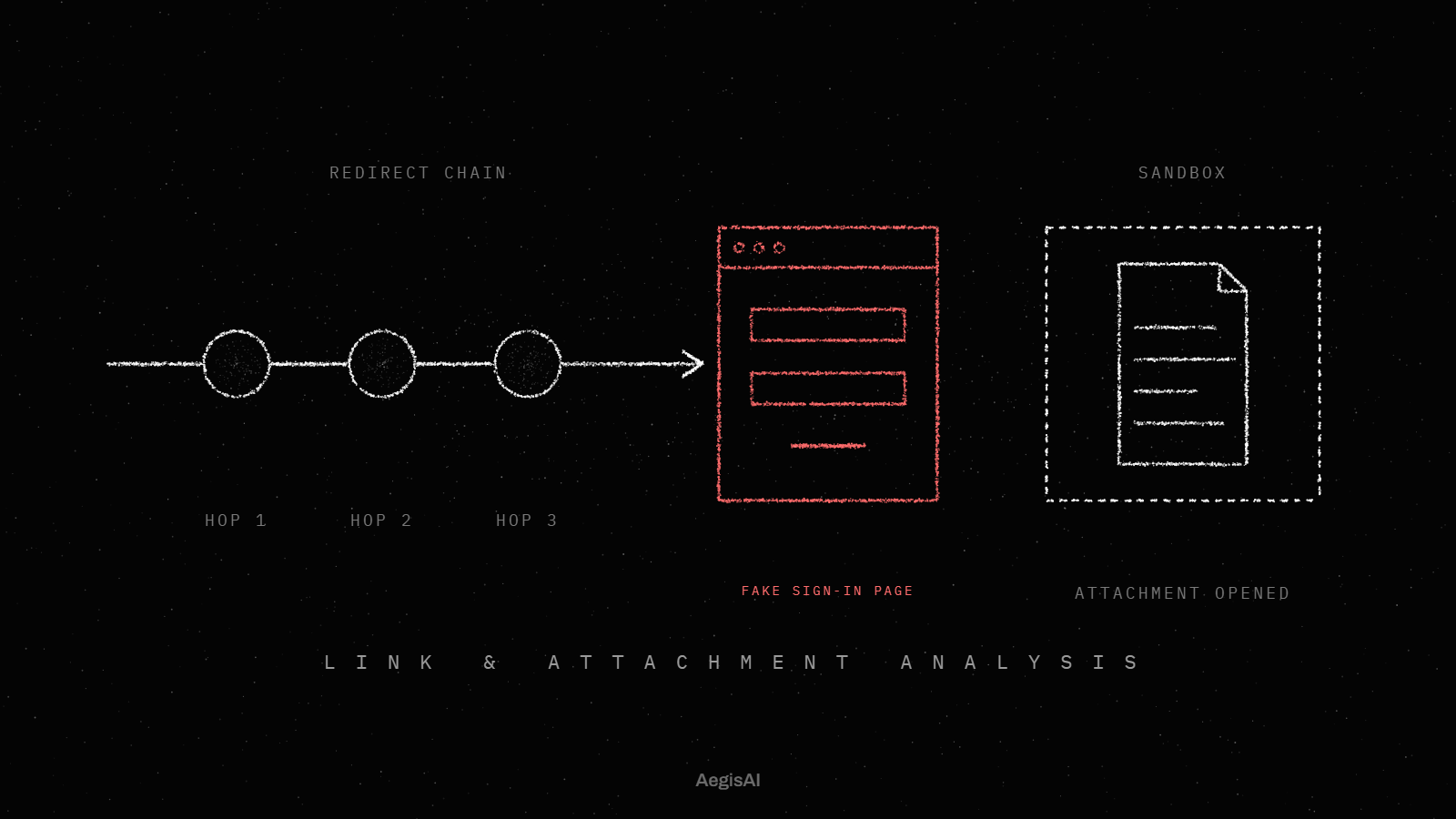
Three days later the clerk opens the document page. Its only content is a sign-in button that posts the password to a third party. ZAP's 48 hour window has passed.
What would have caught it: a check that this sender has never before asked to change bank details, and a sandbox that followed the link past the shared page to the form at its end.
AegisAI opens every link, file and QR code in a sandbox, follows it to the end, and judges what it finds there. Attackers hide the page behind redirects and human checks, often on infrastructure you trust22. AegisAI reads mail through the API, reaches a verdict in 1.9 seconds at the median, and removes a convicted message within seconds23.
An API-native layer reads mail inside the tenant after Defender has delivered it, so it sees what passed. AegisAI reads mail through the API and reaches a verdict in 1.9 seconds at the median. The phishing prevention page shows how it follows links after delivery. For how that layer sits beside Defender in E3 and E5 tenants, see how to add email security on top of Microsoft 365 E3 or E5. The demo page sets up a test on your own tenant.
Track three numbers from the day the presets go on.
Impersonation detections. Count user and domain impersonation hits each week. The count should rise once the protected users list holds your senders3.
Bypassed messages. Count delivered phish whose header shows SFV:SKN15. The target is zero after step 7.
Post-delivery removals. Count messages ZAP quarantined, and how many phish were found after its 48 hour window closed17. The second number shows what Defender alone would have left in the inbox.
Not on its own. Its impersonation check skips senders a recipient has emailed before, and ZAP looks back only 48 hours. Tune it first, then add a reader that judges what each message asks for.
Use Strict for executives and the finance team, and Standard for everyone else. Strict sets the phishing threshold to 4, Most aggressive, against 3 in Standard. Higher thresholds raise false positives, so keep Strict for the people attackers target most.
The sender controlled the domain. A lookalike domain with valid DNS records passes all three checks, and so does a real account that was taken over. Authentication proves which domain sent the mail, not that the request is safe.
Up to 350 users per anti-phishing policy and up to 50 custom domains. Pick executives and the suppliers who send invoices: the senders whose requests staff act on without asking.
Yes, but it cannot be the main control. AI-enhanced phishing draws a 54 percent click-through rate, 4.5 times higher than traditional methods. Training helps users report what gets through; the mail system should still decide first.