AegisAI Perspectives · 085
Protect OT engineers from phishing by making a stolen password useless at the plant boundary and keeping email off the accounts that run plant systems.
Make a phished password useless at the plant boundary, and keep email away from the accounts that run plant systems. Manufacturing accounted for 27.7% of incidents observed by IBM X-Force1. AegisAI's Q3 2026 report found that 3 of 5 real attacks hosted the credential harvest on legitimate infrastructure21, so a link that looks clean at the first hop can still end at a fake sign-in page. For the sector buying guide, read email security for manufacturing companies.
The UK NCSC says staff who administer IT systems are of greater interest to an attacker and may face sophisticated spear phishing3. Passwords for accounts that administer IT systems are a key target.
The NCSC lists vendor supply chains and remote access arrangements among the risks that may lead to downtime, safety incidents or environmental harm9. Attackers use stolen credentials to access more systems, for data exfiltration or sabotage17.
IBM X-Force counted a nearly 4X increase in large supply chain or third-party compromises since 20202. In a flat OT network with vendor VPN access, a contractor connecting one machine could reach every other device on the network18.
The NCSC published eight secure connectivity principles for OT, with partners including CISA and the FBI10. To count which plant staff have a mailbox at all, read how a manufacturer should choose email security for office and plant staff.
The NCSC's Principle 5 says to implement phishing resistant MFA for external services11. Access to human-to-machine connectivity should require MFA to prevent unauthorised control actions.
For remote vendor support, the NCSC asks for brokered connections through a secure gateway in a DMZ15. Replace a VPN endpoint per third party with one remote access solution hosted in the DMZ16.
Use just-in-time access, which enables connectivity only when required and disables it otherwise. Initiate connections as outbound from inside the OT environment, so no inbound port waits for a phished login.
The NCSC says people with administrator accounts should not use them to check email or browse the web5. Give each engineer one mailbox account and a separate account for plant systems.
The browse down principle says to trust your administration device as much as, or more than, the system you manage19.
The NCSC asks that important email requests be verified by a second type of communication, such as a phone call6. Apply that to every request for a new vendor portal, a password reset or a remote support tool.
Any attempt to use a break-glass account should trigger the highest criticality alarm in your SOC20.
| Lure in the email | What the attacker wants | Control at the plant boundary | Control in the mailbox |
|---|---|---|---|
| Vendor portal password reset | The engineer's remote access password | Phishing resistant MFA on external services | Follow the link to its final page |
| Invitation to a remote support session | A remote tool on an engineer's laptop | Brokered gateway in the DMZ | Second channel check on the request |
| New VPN profile or endpoint for a vendor | A direct path into the OT network | One central remote access solution | Second channel check on the request |
| Urgent maintenance window request | Access opened outside a planned job | Just-in-time access | Second channel check on the request |
| Admin account invited to a shared file | Credentials for an account that runs plant systems | No email on administrator accounts | Follow the link to its final page |
Illustrative example, figures are fictional. Northfield Castings (fictional) runs 3 plants with 42 OT engineers and 9 outside integrators. On a Tuesday, 6 engineers receive an email titled "Remote access portal certificate expires in 24 hours". The link opens a real file share, then 2 redirects lead to a copy of the portal sign-in page. 1 engineer enters a password. The gateway asks for a FIDO2 key that the attacker does not hold, so the session fails. The plant team removes the remaining 5 copies and resets the 1 password within 40 minutes.
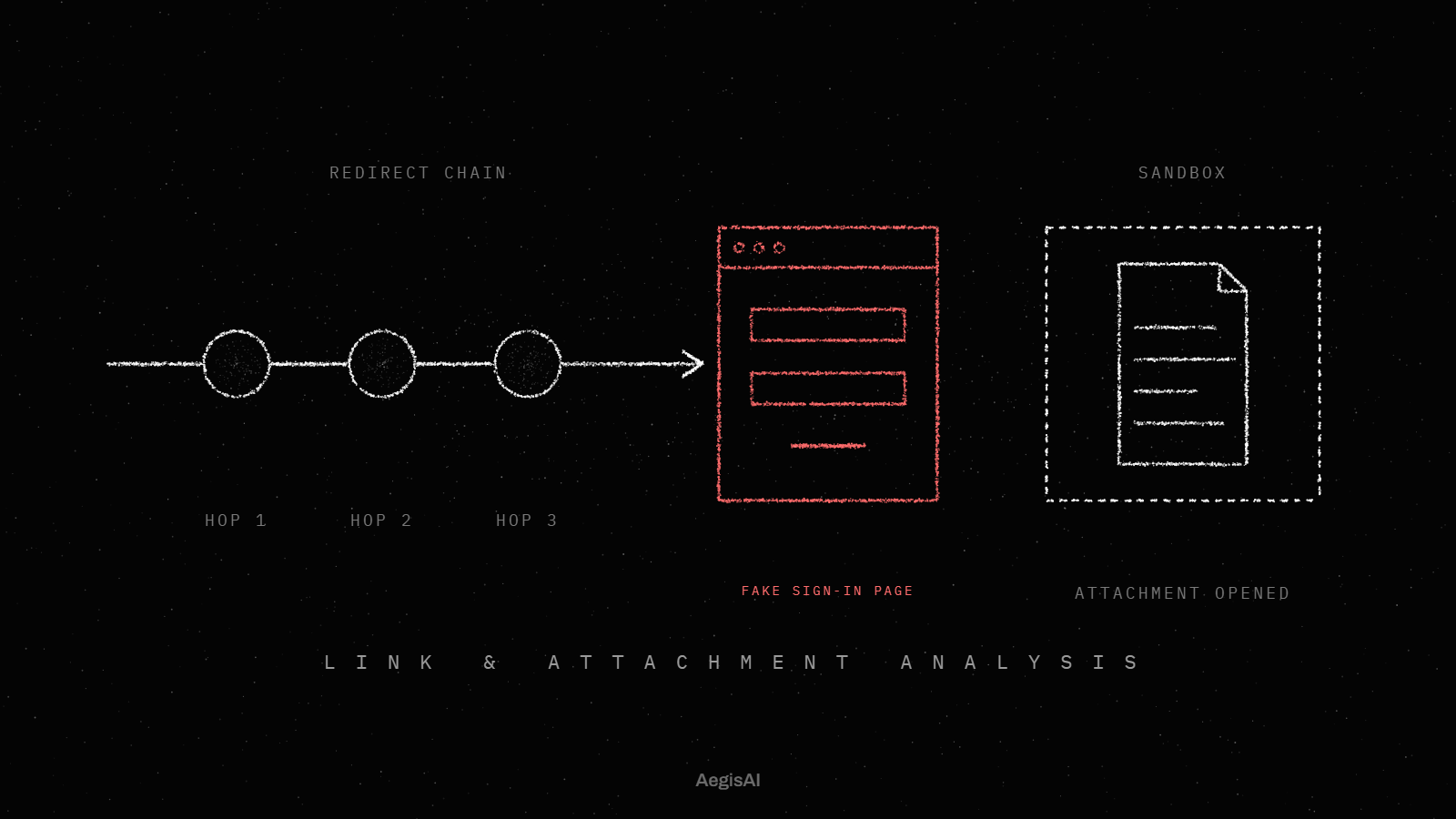
AegisAI opens every link, file and QR code in a sandbox, follows it to the end, and judges what it finds there22, as the phishing prevention page describes. It follows every redirect hop by hop in an isolated browser, and records the chain in the verdict. A CAPTCHA or other gate counts as evidence, and a hidden page is never scored clean. AegisAI reads mail through the API, reaches a verdict in 1.9 seconds at the median, and removes a convicted message within seconds.
Ask your email team for these three checks on any link in a plant remote access lure:
To see how links in your own mail end, run a read-only trial through the demo page.
Require phishing resistant MFA on every external path into OT, and route access through one brokered gateway in the DMZ. Keep email off administrator accounts. Verify emailed remote access requests on a second channel.
Phishing resistant MFA blocks the stolen password at the boundary. The NCSC also asks for just-in-time access, so the connection exists only when a job needs it. Add a second channel check for emailed requests.
No. The browse down principle says to trust your administration device as much as, or more than, the plant system. The NCSC says administrator accounts should not read email or browse the web.
Route vendor support through brokered connections in a DMZ, and use one central remote access solution in place of a VPN per vendor.
No. The NCSC says break-glass access is for emergencies only and should not be a standard remote access method. Any attempt to use a break-glass account should raise the highest criticality alarm in your SOC.
In an NCSC case study, a filter stopped 1,750 of 1,800 phishing emails, and 50 reached inboxes. 14 were clicked and 1 instance of malware was installed, so the plant controls above still matter.