AegisAI Perspectives · 132
A software startup on Google Workspace turns on Gmail's spoofing and link settings first, then adds an API layer that reads intent in AI-written phishing.
See it on your own Google Workspace or Microsoft 365 tenant. No MX change.
Or get the Q3 2026 State of the AI Attack report (free, instant download)
Not ready for a demo? Check your domain (free, about 10 seconds).
A software startup on Google Workspace stops AI-written phishing in two moves: turn on Gmail's spoofing protection first, then add a second layer that reads what each message asks for1. AegisAI research found AI-generated phishing got past Gmail and Microsoft tier-1 filters 50.3 percent of the time, against 28.5 percent for human-written phishing23.
AegisAI connects to Microsoft 365 or Google Workspace through the API, judges every message by its intent, and removes what fails from every mailbox it reached17. If you run IT for a software startup of 20 to 500 people on Google Workspace, with a lean IT or security team and no SOC, this is the order of work for you. The product side is on the inbound email security page. How to connect a second layer is in how to add a third-party email security layer to Google Workspace. What changes inside the message is in how AI-generated phishing differs from traditional phishing.
Their names and code are public, and AI makes a message written for one person cheap. The FBI says criminals use AI-generated text to appear believable to a reader11. They also create messages faster, to reach a wider audience with believable content12.
In a September 2024 warning about North Korean actors targeting the cryptocurrency sector, the FBI said the actors may impersonate recruiting firms or technology companies13. It lists a request to complete a pre-employment test or debugging exercise that involves running unfamiliar code or packages as a potential indicator14.
Founders get fake requests under their own names, because a name on the website is all a sender needs to borrow it. Step 2 below is the Gmail setting for that case. Tell every engineer in writing that a coding test from a stranger never runs on a work laptop.
Short on time? Watch the explainer, or book a demo.
Steps 2 to 6 sit in the Google Admin console. Step 6, enhanced pre-delivery message scanning, needs the Gmail Settings administrator privilege4.
Publish SPF and DKIM, then DMARC. Google recommends you set up SPF, DKIM, and DMARC for your organization10. Allow 48 hours after SPF or DKIM before you set up DMARC7, and start the policy at p=none8.
Turn on protection against spoofing of employee names. It acts on messages where the sender's name is a name in your Google Workspace directory, but the email isn't from your company domain. At a startup, that covers every founder whose name is on the website.
Set a stricter action on each spoofing setting. Gmail's default is to display warnings and move untrustworthy emails to the spam folder2. Choose Quarantine for employee name spoofing, so an admin sees each fake founder email first.
Turn on the links and external images settings. Gmail can identify links behind short URLs and scan linked images. It can also warn on clicks to untrusted domains3.
Turn on Security Sandbox for attachments. The setting is off by default6, so a new tenant does not run it until an admin does.
Turn on enhanced pre-delivery message scanning. When Gmail detects suspicious content, delivery is slightly delayed so Gmail can do additional security checks5.
Turn on all six in one sitting, then send a test message from a personal address under a founder's name to confirm step 2 fires.
They miss the message that carries nothing to scan. Link checks need a link, and the sandbox needs an attachment. A fluent note that asks an engineer to reply, or a founder to approve a change, has neither.
A pass on domain authentication shows which domain sent a message, not whether the request inside it is honest. A recruiting domain registered last week can pass every check.
Employee name spoofing has a limit too. It matches names in your own directory, so a fake recruiter or a fake investor, whose name is not in your directory, never trips it.
Google says it plainly: sometimes spam messages are sent to your inbox, instead of to the Spam label9. Pull the last 10 phishing reports from your team and mark which ones had no link and no attachment.
Add it when the six settings are on and the messages that still arrive carry no link or file. Any one of these signs is enough:
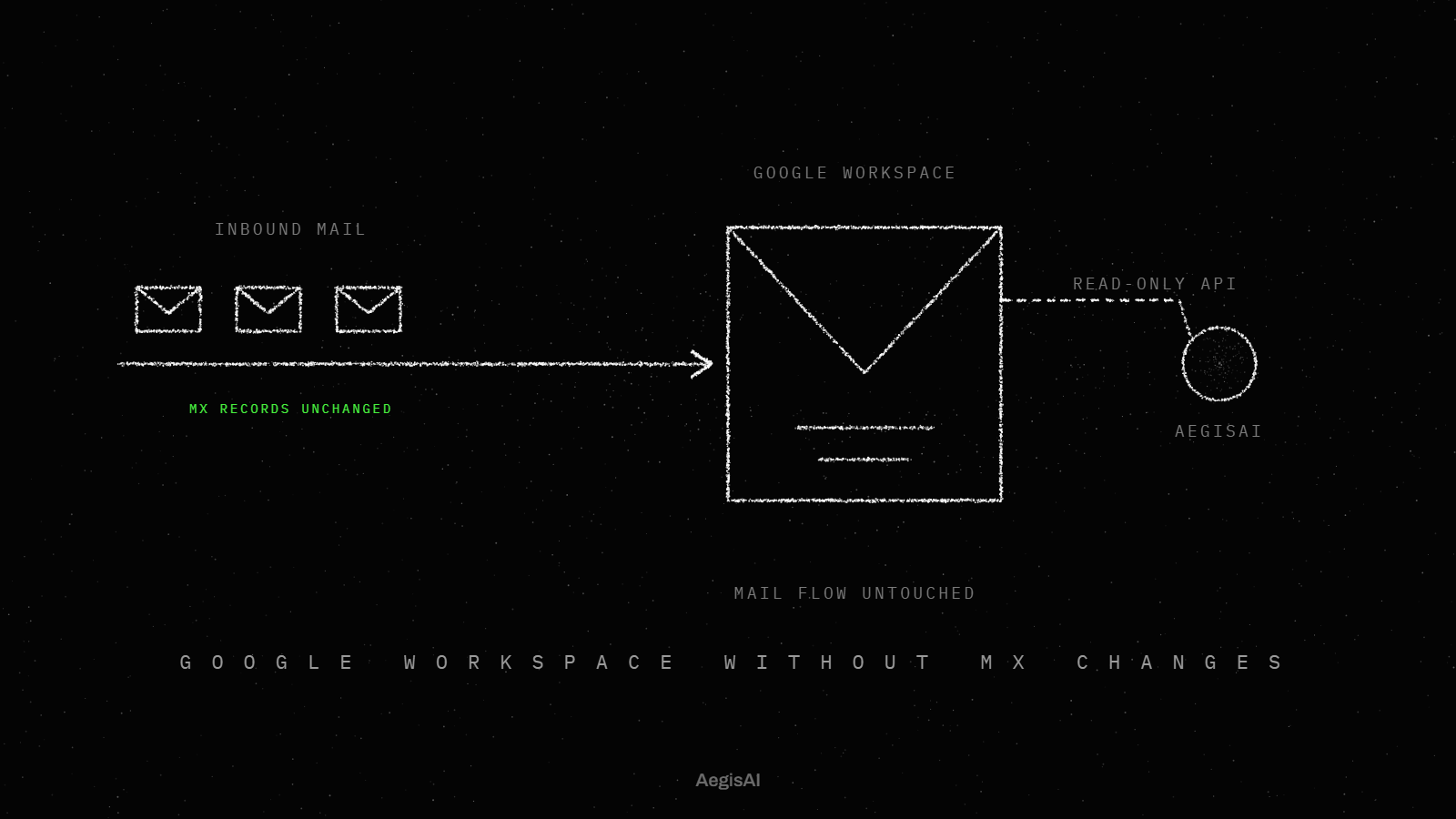
A layer that connects by API changes no mail routing. The inbound email security layer, for example, reads mail through the Microsoft 365 or Google Workspace API after delivery, with no MX change and no gateway18. Why no MX change is needed is in Google Workspace email security without MX changes.
Run any second layer read-only through the whole trial before you grant it permission to remove mail.
| Message | Gmail settings above | What to ask of a second layer | Inbound email security |
|---|---|---|---|
| Link to a fake login page | Links behind short URLs and untrusted domains | Does it read the request around the link? | Judges every message by its intent |
| Founder name from an outside address | Employee name spoofing | Does it check who normally writes to whom? | Catches fake executives, vendors and payment requests21 |
| Fluent text, no link, no file | Nothing to scan; some spam reaches the inbox | Does it judge the message with nothing to scan? | Even with no link or file to scan |
| Reason a person can read | A warning banner on the message | Does each verdict come with a reason? | Its reason in plain language20 |
| Holds mail before delivery | Yes, pre-delivery scanning delays suspicious mail | Where does it sit in mail flow? | No edge. It reads mail through the API after delivery |
The last row is the honest one: Gmail can hold suspicious mail before delivery, and the inbound email security layer reads mail after delivery. Fill one copy of this table for each second layer you test.
Catches fake executives, vendors and payment requests, even with no link or file to scan. It reads mail through the Microsoft 365 or Google Workspace API after delivery. Runs in monitoring mode first19. Every verdict comes with its reason in plain language, so your team can check it and share it.
Illustrative example, figures are fictional: Northloop Labs (fictional) is a 60-person software startup on Google Workspace with one part-time IT admin. A staff engineer gets a warm, well-written note from a talent partner at a recruiting domain registered nine days earlier. It names his open-source parser project and his last two conference talks, and asks only for a time to talk. Every sender check passes. There is no link and no attachment, so the link checks and the sandbox have nothing to scan, and the sender's name is not in the directory. The message lands in the inbox. Two days later, a second email sends a debugging exercise repository. The admin, running a second layer read-only, sees the first message flagged as a recruiter lure aimed at an engineer with production access, with a three-line reason. She warns the engineer before he clones the repository.
Walk one real reported message from your own tenant through this example before you pick a layer.
Track three numbers, each from a log you already have or a trial log.
To get the third number on your own tenant, book a read-only trial. Put the three numbers side by side on day 30 and decide on them.
Set up domain authentication first, and wait 48 hours after SPF or DKIM before DMARC. Then turn on the Gmail protections on this page, starting with employee name spoofing and pre-delivery scanning. Then add a layer that reads intent. AegisAI connects to Google Workspace through the API, judges every message by its intent, and removes what fails.
It checks links and attachments once you turn the settings on, and flags directory names used from outside addresses. Google notes that some spam still reaches the inbox. The gap is fluent text with no link or file, which those settings have nothing to scan in.
Protection against spoofing of employee names. It acts on mail where the sender's name is in your directory but the email is not from your company domain. Set its action to Quarantine. It does not catch a fake recruiter, whose name is not in your directory.
Not for a layer that connects by API. The inbound email security layer, for example, reads mail through the Microsoft 365 or Google Workspace API after delivery, with no MX change and no gateway.
Allow 48 hours after setting up SPF or DKIM, then start DMARC with the policy at p=none. Move to a stricter policy once the reports show your own senders pass.
In a September 2024 warning about North Korean actors targeting the cryptocurrency sector, the FBI said they may impersonate recruiting firms or technology companies. It lists a request to run unfamiliar code or packages as a pre-employment test as a potential indicator. Run any take-home test from a stranger outside work machines.