AegisAI Perspectives · 127
Secure Microsoft 365 email in order: block legacy sign-in, publish DMARC, apply a preset policy, then add a layer that keeps checking mail after delivery.
See it on your own Google Workspace or Microsoft 365 tenant. No MX change.
Or get the Q3 2026 State of the AI Attack report (free, instant download)
Not ready for a demo? Check your domain (free, about 10 seconds).
Secure it in order. Lock down sign-in and sender records, turn on a preset security policy, then add a layer that keeps checking mail after delivery. Microsoft recommends two security levels: Standard and Strict1.
AegisAI investigates every email for what it is trying to do, and removes the ones that fail from every mailbox they reached17. If you run IT for a company of 20 to 500 people on Microsoft 365, with a lean IT or security team and no SOC, these are the steps in the order to take them. The post-delivery layer is described on the inbound email security page. Why attackers aim at Microsoft 365 is covered in the biggest email threats facing Microsoft 365 users. What to ask a vendor is in how to choose email security for Microsoft 365. This page is the order of work.
Check which Defender for Office 365 plan your licence includes first: Plan 1 contains a subset of the features in Plan 215.
Block legacy authentication with a Conditional Access policy. Based on Microsoft's analysis, more than 97 percent of credential stuffing attacks and more than 99 percent of password spray attacks use legacy authentication protocols13.
Publish SPF and DKIM for every domain that sends mail, then add DMARC. Start at p=none, monitor the results, then move to p=quarantine and then p=reject12.
Apply the Standard or Strict preset security policy. Preset policies apply many email protection features to users based on Microsoft's recommended settings3. Anyone left out gets only the Built-in protection policy, with basic Safe Attachments and Safe Links4.
Confirm Safe Links is on. It scans and rewrites links in inbound mail during mail flow. It checks them again when a user clicks, in Teams and supported Office 365 apps too5.
Confirm Safe Attachments is on. It opens attachments in a virtual environment before delivery, a process called detonation6. Scanning typically completes within 15 minutes7.
Add user impersonation protection for the people attackers pose as. Start with executives and payroll staff. Each anti-phishing policy holds a maximum of 350 users8.
Leave zero-hour auto purge (ZAP) on. It goes back over delivered mail and neutralizes harmful messages found after delivery10.
Turn on the built-in Report button in Outlook so users can report good and bad messages14. Send reports to a mailbox one named person reads every day.
Do steps 1 and 2 this week, before you change any filtering policy.
Short on time? Watch the explainer, or book a demo.
Filtering reads the result of authentication. If SPF, DKIM or DMARC are missing or misconfigured, legitimate messages can land in Junk Email or quarantine, even with the recommended policy settings2. Fix the records first and the preset policy works on clean signals.
Legacy authentication is the same kind of foundation. Microsoft ties more than 99 percent of password spray attacks to legacy protocols, so close them before you tune any filter.
Read your DMARC reports for two weeks at p=none before you tighten the policy.
It falls short after delivery. Four gaps remain once the eight settings are on.
Write down which of these four gaps you can see in your own tenant before you add anything.
A post-delivery layer keeps judging mail after it reaches the inbox, and removes it from every mailbox it reached. It reads the request itself, so a payment change with no link still gets a verdict.
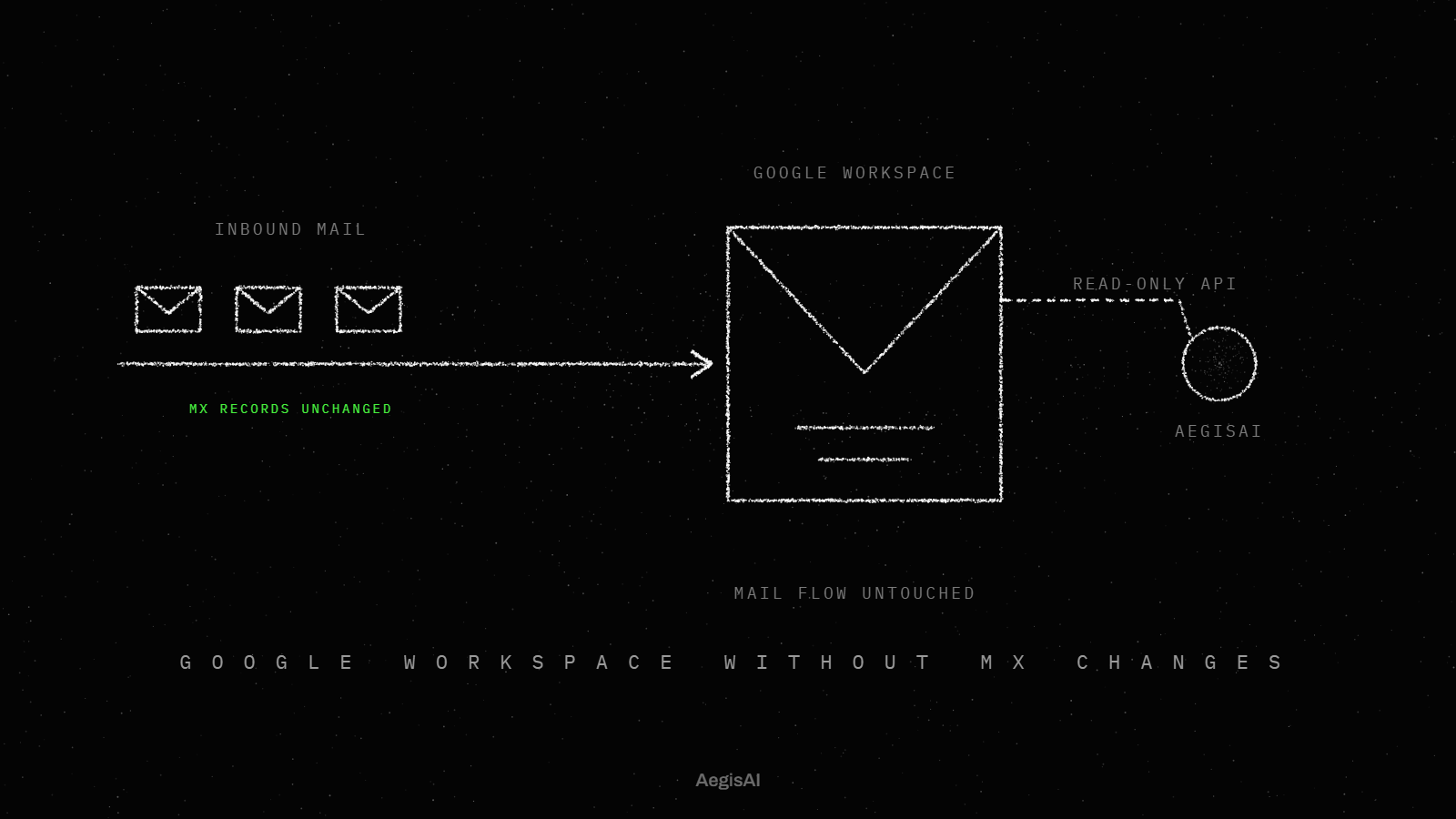
Placement decides what it can do. A gateway sits in front of Microsoft 365 in mail flow. A layer that reads mail through the Microsoft 365 API after delivery needs no MX change18, so the eight settings above stay in place. It also cannot stop a message before it lands. That is why the preset policies stay on.
Run any second layer in monitoring mode next to your current settings before it acts on mail.
| Gap | Native Microsoft 365 setting | Post-delivery layer | Inbound email security |
|---|---|---|---|
| Malicious links | Safe Links rewrites links and checks them at the time of click | Follows the link after delivery | Opens every link, file or QR code in a sandbox21 |
| Malicious files | Detonation before delivery, typically within 15 minutes | Depends on the product | The same sandbox, followed to the end |
| Mail found bad after delivery | ZAP, last 48 hours only | Keeps judging delivered mail | Removes the ones that fail from every mailbox they reached |
| Payment request with no link | Impersonation protection, up to 350 users per policy | Reads the request in context | Reads the thread the way an analyst would22 |
| Time to verdict | Attachment scan typically within 15 minutes | Depends on the product | 1.9s median from arrival to verdict, removal within seconds19 |
| Stops mail before delivery | Yes, Safe Attachments works before delivery | No | No edge. It reads mail through the API after delivery |
The last row is no edge for the inbound layer: it acts after delivery, so the native settings still do the blocking in mail flow. Fill one copy of this table for your own tenant.
AegisAI investigates every email for what it is trying to do, and removes the ones that fail from every mailbox they reached. It reads mail through the Microsoft 365 or Google Workspace API after delivery. It opens every link, file and QR code in a sandbox, follows it to the end, and judges what it finds there.
Illustrative example, figures are fictional: Cedar Row Dental Group (fictional) has 210 people on Microsoft 365 and one IT manager. In week one she blocks legacy authentication and publishes DMARC at p=none. In week three she applies the Standard preset policy to every user and adds 14 executives and finance staff to impersonation protection. In week five a message from a lookalike of the group's lab supplier asks accounts payable to change bank details. It passes DMARC. It carries no link or file, and the payables clerk is not on the impersonation list. The post-delivery layer, running in monitoring mode, flags it seconds after delivery with a three-line reason. She confirms by phone with the supplier and deletes the message.
Walk one real reported message through these steps in your own tenant this week.
Track three numbers, each from a log you can export.
Connect a tenant and run the second layer in monitoring mode, then compare it with what your current stack delivered20. To run that second layer next to your own settings, book a monitoring-mode trial. Put the three figures side by side on day 30 and decide on them.
This page makes no claim that any setting or product meets HIPAA or SOC 2. The three exports above are records you control, with dates. Ask your auditor which controls your framework requires, then file the exports with your audit evidence.
Block legacy authentication. Publish sender records, ending with DMARC at p=reject. Apply a Standard or Strict preset policy, then confirm the Defender settings in steps 4 to 7. Then add a post-delivery layer: AegisAI investigates every email for what it is trying to do, and removes the ones that fail from every mailbox they reached.
Not on its own. Impersonation can pass every sender check (SPF, DKIM, DMARC) when the attacker uses a lookalike domain with valid DNS records. Add impersonation protection for the people attackers pose as.
ZAP searches only the last 48 hours of delivered email. A message judged bad after that window stays in the mailbox until someone removes it.
Based on Microsoft's analysis, more than 97 percent of credential stuffing attacks and more than 99 percent of password spray attacks use legacy authentication. Close that door before you tune any filter.