AegisAI Perspectives · 128
Often not, since E5 already includes Defender for Office 365 Plan 2, but keep or add a layer when one of the seven checks on this page fails on your mail.
See it on your own Google Workspace or Microsoft 365 tenant. No MX change.
Or get the Q3 2026 State of the AI Attack report (free, instant download)
Not ready for a demo? Check your domain (free, about 10 seconds).
Often not for filtering alone: Microsoft 365 E5 includes Microsoft Defender for Office 365 Plan 27. Keep or add a layer only when one of the checks below fails.
AegisAI investigates every email for what it is trying to do, and removes the ones that fail from every mailbox they reached2. If you run IT for a company of about 20 to 500 people on Microsoft 365 or Google Workspace, with a lean IT or security team and no SOC, and a gateway renewal is coming up, these checks are for you. The after-delivery layer is described on the inbound email security page. How to add a layer on top of E3 or E5, step by step, is in how to add email security on top of Microsoft 365 E3 or E5. This page answers the question before that one: does the gateway stay?
E5 puts Microsoft's own filter where a gateway used to sit. Defender for Office 365 Plan 1 protects email and collaboration features against zero-day malware and phishing, and against business email compromise (BEC)10. Plan 2 adds phishing simulations, post-breach investigation, hunting, response and automation.
After delivery, zero-hour auto purge (ZAP) retroactively detects and neutralizes malicious phishing, spam or malware messages that were delivered to cloud mailboxes12. Its search is limited to the last 48 hours of delivered email.
The line between E3 and E5 has also moved. Beginning July 1, 2026, Plan 1 is included with Office 365 E3 and Microsoft 365 E38. What E5 adds for email is now mostly Plan 2 and its investigation tools.
Where it falls short depends on your team. ZAP looks back only 48 hours, and Plan 2 investigation needs someone to run it. List which of these features are switched on in your tenant before you price a gateway renewal.
Short on time? Watch the explainer, or book a demo.
A gateway in front gives you a second decision before mail reaches Microsoft, from a different filter. That is the case for keeping one. The cost is in mail flow, and Microsoft spells it out.
Your domain's MX record must point to the third-party provider21. Microsoft strongly recommends that you enable Enhanced Filtering for Connectors or bypass filtering completely using a mail flow rule. Microsoft also says that of the three integration options non-Microsoft services typically suggest, not all are equally supportable by Microsoft15.
Reporting is the hidden cost. With a gateway in front, messages are counted twice in most reporting tools, Threat Explorer and Advanced Hunting among them, plus automated investigation and response (AIR)19. Those are the Plan 2 tools E5 pays for.
Write down the one reason you would keep the gateway, in a single line, before the renewal call.
An API layer reads mail that has already arrived. Microsoft describes it plainly: some non-Microsoft services authenticate and use the Microsoft Graph API to scan messages after they are delivered to user mailboxes17. This integration typically requires granting the service full access to mailboxes18.
It adds a second judgment without moving the MX record, on mail that has already passed Microsoft's filter. It does not hold mail before delivery. Microsoft's own view is that no number of layers takes total protection to 100 percent20, so the question is which second layer catches what reaches your inboxes.
That gap is measurable. AegisAI research found that AI-generated phishing got past Gmail and Microsoft tier-1 filters 50.3 percent of the time, against 28.5 percent for human-written phishing26. That is a tier-1 filter figure, not a Plan 2 measurement, so test it on your own mail.
Ask any API layer for its permission scope in writing before you connect it.
Confirm every mailbox is licensed for E5 or Defender for Office 365 Plan 2. A gap in licences is a gap in protection.
Confirm the Plan 1 protections and ZAP are switched on, not only licensed.
Count what reached the inbox. Export 30 days of user-reported phishing and post-delivery removals. BEC alone cost $2,770,151,146 in reported losses in 202425, so one missed payment request matters.
Check who uses Plan 2. Plan 2 investigation and response need someone to run them. With no SOC, write down who opens Threat Explorer each week, if anyone.
List every mail flow rule, archive or compliance step that depends on the MX record pointing to the gateway.
If the gateway stays, enable Enhanced Filtering for Connectors and expect Plan 2 reporting tools to count each message twice.
Decide. If checks 1 to 4 pass and nothing in check 5 needs the gateway, plan to retire it at renewal. If check 3 finds phishing in inboxes, test a second layer after delivery in monitoring mode first.
Run checks 1 to 3 this week; they need only the admin portal and an export.
| Criterion | E5 alone | E5 with a third-party SEG in front | API layer after delivery |
|---|---|---|---|
| MX record | Points to Microsoft 365 | Must point to the third-party provider | No MX change, no gateway |
| Second judgment | None, Plan 2 only | A second filter before Microsoft | Investigates every email for what it is trying to do |
| Removal after delivery | ZAP, last 48 hours of delivered mail | ZAP still runs inside Microsoft 365 | A verdict in 1.9 seconds at the median, removal within seconds3 |
| Plan 2 reporting | No second hop to count | Counted twice in Threat Explorer and other Plan 2 reports | No published figure on reporting effects |
| Mailbox access needed | None beyond Microsoft 365 | Connector settings in Exchange Online | Reads mail through the Microsoft 365 or Google Workspace API |
| Holds mail before delivery | Yes, inside Microsoft 365 | Yes, at the edge | No edge. It reads mail through the API after delivery |
The last row gives the API layer no edge: it acts after delivery, not before. API layers in general typically need full mailbox access, so weigh that too. Fill one copy of this table with your own tenant's answers before the renewal date.
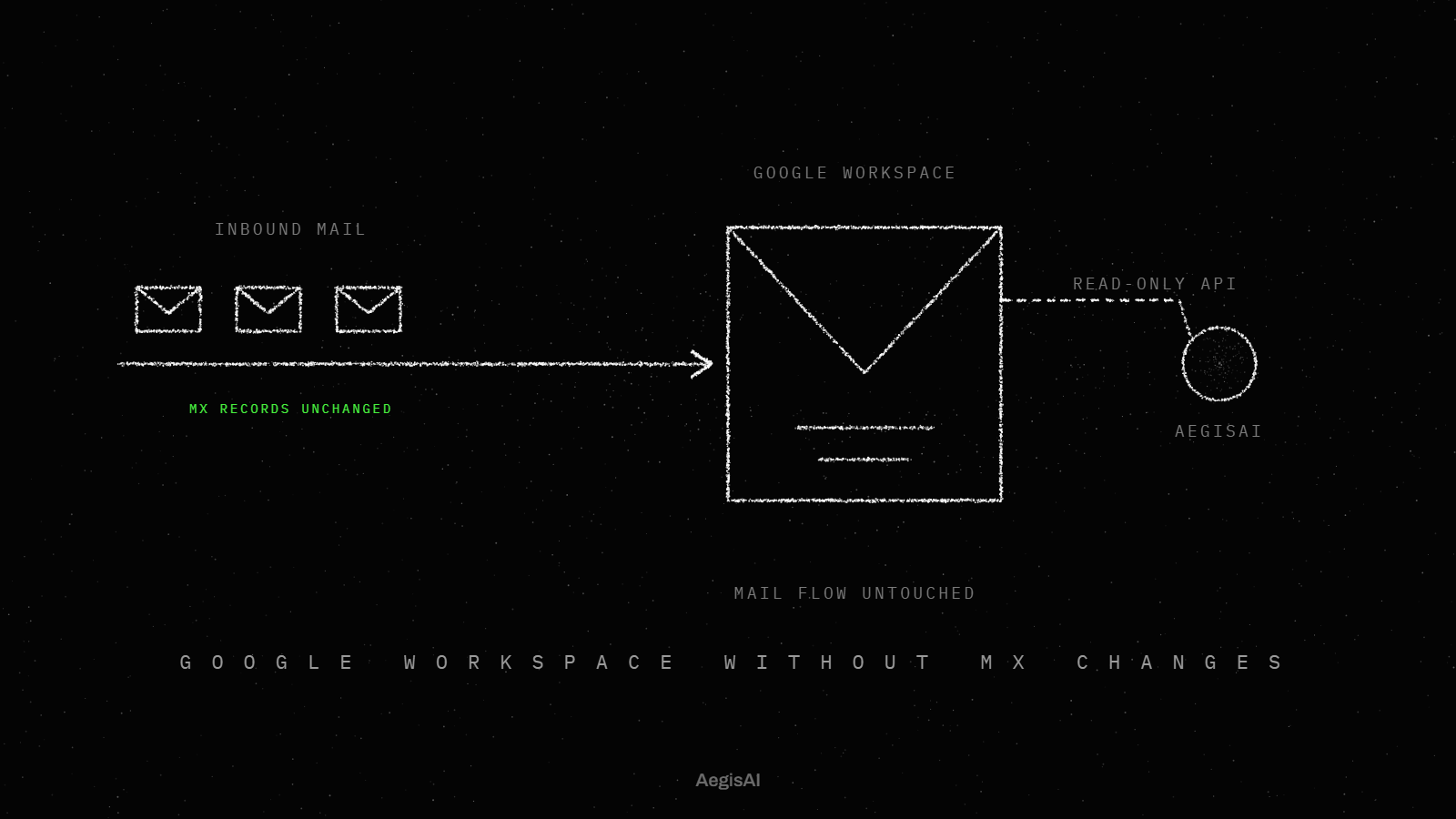
AegisAI investigates every email for what it is trying to do, and removes the ones that fail from every mailbox they reached. It reads mail through the Microsoft 365 or Google Workspace API after delivery: no MX change, no gateway. It works with your gateway or Defender, and archiving and your identity provider stay where they are5. It reaches a verdict in 1.9 seconds at the median, and removes a convicted message within seconds.
Check whether a written control names the gateway itself or the outcome it delivers. In your HIPAA or SOC 2 audit evidence, look for controls that point to a mail flow rule, an archive journal or a filtering log. If the gateway is the only place one of those lives, it ties the MX record to the provider, and moving it is a project, not a switch.
If the control names an outcome, such as filtering or retention, the outcome can move with the evidence. Ask your auditor in writing which artifacts must survive the change, and keep the gateway logs for the full retention period.
List each audit artifact the gateway produces, and its new home, before you set an end date.
Illustrative example, figures are fictional: Ridgeway Dental Group (fictional) has 140 people on Microsoft 365 E5 and one IT admin, and its gateway renewal is due in 60 days. Check 1 finds 6 shared mailboxes without a Plan 2 licence. Check 2 finds ZAP on but impersonation settings left at default. Check 3 finds 23 user-reported phishing emails in 30 days, 4 of them invoice requests from a real supplier's hijacked mailbox. Check 4 finds no one has opened Threat Explorer since setup. Check 5 finds one archive rule tied to the gateway, which the archive vendor can move. The admin fixes the licences and settings, starts an after-delivery layer in monitoring mode, and books the gateway to end at renewal if the monitoring numbers hold.
Run checks 1 to 5 on your own tenant before the renewal call.
Track three numbers, each from a log you can export.
To see it on your own mail, start a monitoring-mode trial: connect a tenant, run it in monitoring mode, and compare it with what your current stack delivered4. Put the three figures next to the renewal price on day 30 and decide.
Often not for filtering alone, because E5 includes Defender for Office 365 Plan 2. Keep one only if a mail flow rule or compliance step needs it. If phishing still reaches inboxes, add a second layer after delivery: AegisAI reads mail through the API after delivery, with no MX change and no gateway.
Yes. Defender for Office 365 Plan 2 is included in enterprise Microsoft 365 subscriptions, E5 among them.
Since July 1, 2026, E3 includes Plan 1. E5 adds Plan 2: phishing simulations, post-breach investigation, hunting, response and automation.
Yes, with the MX record pointed at the gateway and Enhanced Filtering for Connectors on. Expect messages to be counted twice in Threat Explorer and Advanced Hunting.
It uses the Microsoft Graph API to scan delivered messages, and this typically requires full access to mailboxes. Ask for the permission scope in writing.