AegisAI Perspectives · 137
It is safe when each scope is narrow, scoped to named mailboxes and revocable; see what each Gmail and Microsoft 365 mail permission reads and changes.
See it on your own Google Workspace or Microsoft 365 tenant. No MX change.
Or get the Q3 2026 State of the AI Attack report (free, instant download)
Not ready for a demo? Check your domain (free, about 10 seconds).
Email security vendor API access is safe when the grant is narrow, covers only the mailboxes it needs and can be revoked. On Microsoft 365, Mail.Read as an application permission reads mail in all mailboxes without a signed-in user13.
AegisAI keeps only the metadata needed to run the service (message IDs, counts) and the content of messages flagged as suspicious23. If you run IT for a company of 20 to 500 people on Microsoft 365 or Google Workspace, with a small IT or security team and no SOC, use the table on this page before you approve any vendor's consent screen. How the product reads mail is on the inbound email security page. Whether an AI agent belongs in your inbox at all is covered in can I trust AI agents inside my inbox. This page lists each permission: what it reads, what it changes, who grants it and how to take it back.
Key takeaways
| Question | Answer | Source |
|---|---|---|
| Is it safe to give an email security vendor API access to our mailboxes? | Yes, when each scope is the narrowest that works, the grant covers only the mailboxes needed, and a named admin can revoke it. Microsoft calls admin consent a sensitive operation16 | ,17 |
| What can a vendor read with Microsoft Graph Mail.Read? | Mail in all mailboxes, without a signed-in user, unless you scope it | |
| Which Gmail scope reads mail without changing it? | gmail.readonly views messages and settings2. gmail.metadata sees headers and labels, not the body | |
| Who approves the grant? | On Google Workspace, a super administrator7. On Microsoft 365, an admin gives consent for the whole tenant | |
| How do you take access back? | Delete the domain-wide delegation client, or revoke admin-granted permissions in Entra ID | |
| Can Microsoft 365 limit an app to some mailboxes? | Yes, with RBAC for Applications, if you also remove the unscoped Entra ID grant19 |
Short on time? Watch the explainer, or book a demo.
Grant the smallest scope to the fewest mailboxes, with a tested way back. The steps below cover the permission itself. How to scope a read-only trial is in how to structure a read-only email security proof of concept; this page does not repeat it.
Ask the vendor for its exact scope list in writing: each Gmail scope, each Microsoft Graph permission, and whether each is an application or a delegated permission. Match every line to the reference table below.
Start read-only. On Google Workspace, gmail.readonly views messages and settings, and gmail.metadata stops at labels and headers. On Microsoft 365, Mail.Read reads mail in all mailboxes.
On Google Workspace, add only the scopes the vendor listed in domain-wide delegation. Google says each scope should be appropriately narrow8, and the task needs a super administrator.
On Microsoft 365, scope the grant to named mailboxes with RBAC for Applications. Assigning it needs membership of the Organization Management role group25.
Remove any unscoped Mail.Read from Entra ID once the scoped grant exists. Microsoft states that the two together give no effective resource scoping.
Treat the consent click as a change with an owner. Microsoft calls tenant-wide admin consent a sensitive operation. Record who approved it, on which date, for which scopes.
Add write access only when you switch on removal. The inbound product page states it plainly: "Removal needs write access your admin grants and can revoke"21.
Test the way back once, before go-live: delete the client in domain-wide delegation, or revoke the permissions on the app in Entra ID. Note how long it took.
Run steps 1 and 2 before anyone opens a consent screen.
Each row is one mail permission an email security tool can ask for, from Google's and Microsoft's own documentation. On Google Workspace, scopes with wide access to user data are restricted scopes and need restricted scope OAuth App Verification6.
| Platform | Scope or permission | What it can read | What it can change | Who grants it | How to revoke it |
|---|---|---|---|---|---|
| Google Workspace | mail.google.com (full access) | All mail | Compose, send and permanently delete all mail | A super administrator, in domain-wide delegation | Delete the client; dependent apps stop at once |
| Google Workspace | gmail.readonly | Messages and settings | Not covered: the scope views mail | A super administrator, in domain-wide delegation | Delete the client |
| Google Workspace | gmail.metadata | Labels and headers, not the body | Not covered: the scope views metadata | A super administrator, in domain-wide delegation | Delete the client |
| Google Workspace | gmail.modify | Mail3 | Compose and send, but no permanent deletion that bypasses the trash4 | A super administrator, in domain-wide delegation | Delete the client |
| Google Workspace | App access control: Trusted | Trusted reaches all services, restricted ones included10 | Not covered by this setting | An admin, in app access control | Set the app to Blocked: no Google data12 |
| Microsoft 365 | Mail.Read (application) | Mail in all mailboxes, no signed-in user | Not covered: the permission reads mail | Admin consent required | Revoke admin-granted permissions in Entra ID |
| Microsoft 365 | Mail.ReadWrite (application) | Mail in all mailboxes | Create, update and delete mail | Admin consent required | Revoke admin-granted permissions in Entra ID |
| Microsoft 365 | Mail.Send (application) | Not covered by this permission | Send mail as any user15 | Admin consent required | Revoke admin-granted permissions in Entra ID |
| Microsoft 365 | RBAC for Applications resource scope | Limits which mailboxes the app can reach | Not covered by this scope | A member of Organization Management | Remove the role assignment, and the unscoped Entra ID grant |
Copy this table into your vendor review and fill in the scopes each vendor asks for.
Two rows let a vendor destroy or send mail. The full Gmail scope can permanently delete all mail. Mail.Send can send mail as any user. Refuse both unless the vendor shows in writing why its product needs them.
The next control is reach. A Microsoft 365 application grant reaches all mailboxes until you pair it with a resource scope.
The last control is speed of removal. Deleting the delegation client stops the app immediately.
Ask every vendor which of these rows it needs on day one, and which it needs only after the trial.
A narrow scope limits what a vendor can read. Retention limits what it keeps. One published answer is the data retention, encryption and compliance post: it covers which message data is kept and who holds the encryption key24.
Send these five questions with the scope list in step 1, and get the answers in writing.
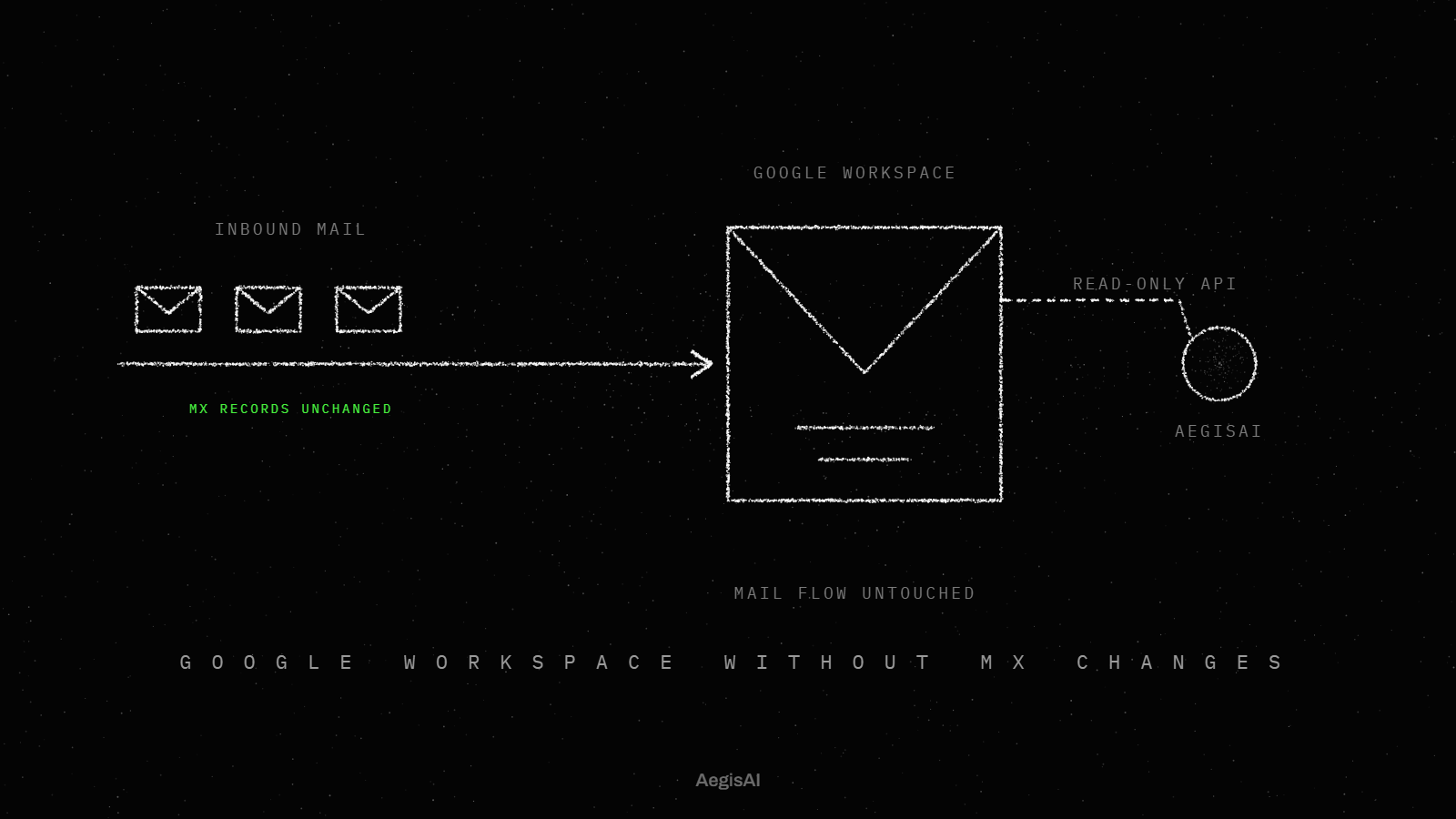
AegisAI supports customer-managed encryption keys (CMEK). You hold the key in your own key management service; AegisAI never possesses it. Reads mail through the Microsoft 365 or Google Workspace API after delivery20. Removal needs write access your admin grants and can revoke.
Track three numbers for every vendor with mailbox access.
To see the exact scopes requested in your own tenant, walk through a connection with the team. Review the three numbers on day 30 and remove any scope nobody can explain.
Yes, when the scope is narrow, the grant covers only the mailboxes needed and an admin can revoke it. AegisAI reads mail through the Microsoft 365 or Google Workspace API after delivery, and removal needs write access your admin grants and can revoke.
No. Mail.Read reads mail in all mailboxes. Sending mail as any user is a separate application permission, Mail.Send. Refuse it unless the vendor shows why it needs it.
Yes. RBAC for Applications pairs the grant with a resource scope that names the mailboxes. Remove the unscoped Mail.Read from Entra ID too, or the scope has no effect.
Applications that depend on that client authorization stop working immediately.
On Google Workspace, domain-wide delegation needs a super administrator. On Microsoft 365, Mail.Read as an application permission needs admin consent, which Microsoft calls a sensitive operation.