AegisAI Perspectives · 124
Evaluate email security for a hybrid Microsoft 365 and Google Workspace estate with one test plan on both tenants, scored per tenant on your own mail.
See it on your own Google Workspace or Microsoft 365 tenant. No MX change.
Or get the Q3 2026 State of the AI Attack report (free, instant download)
Not ready for a demo? Check your domain (free, about 10 seconds).
Evaluate it with one test plan, run on your own mail in both tenants at the same time. AegisAI research found 3 in 10 confirmed phishing emails cleared native Gmail and Microsoft filters in Q3 202627.
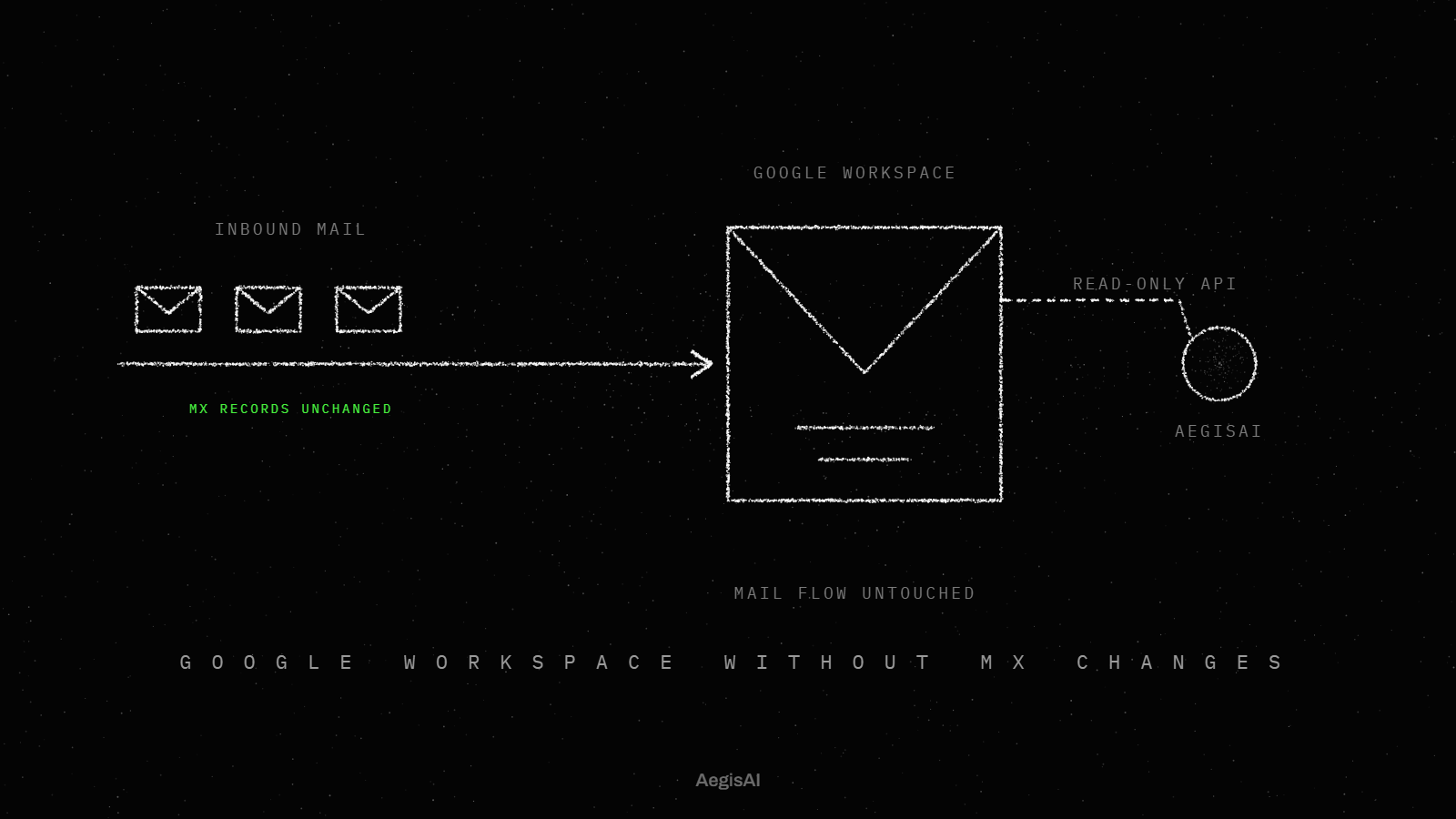
AegisAI reads each tenant through its own API connection after delivery and makes no change to mail routing (MX records)21. If you run IT for a company of 20 to 500 people that uses both Microsoft 365 and Google Workspace, with a lean IT team and no SOC, this checklist is for you. It covers what to test, not how to set it up: the setup steps are in how to run email security across Google Workspace and Microsoft 365, and the product side is on the inbound email security page.
Hybrid email security protects one company whose mailboxes sit on two platforms, here Microsoft 365 and Google Workspace. The checklist applies when one tool must cover both tenants, often after an acquisition or when one team kept its old platform.
Six criteria decide the evaluation, and each one gets its own step in the checklist below. A tool can pass on one platform and fail on the other, so score each criterion twice.
Write the six criteria as the rows of your scorecard before you speak to any vendor.
Short on time? Watch the explainer, or book a demo.
Routing carries the most risk in a mixed estate. When a service sits in the mail path with in-and-out routing, messages are counted twice in most Microsoft reporting tools, including Threat Explorer, Advanced Hunting and automated investigation and response5. Enhanced Filtering for Connectors does not work with that routing either.
An API-based tool reads mail after delivery instead. Some services authenticate and use the Microsoft Graph API to scan messages once they are in user mailboxes2. Either way, Microsoft states that false positives increase as more products are added, and that no number of layers reaches 100 percent protection.
Mark any tool that needs an MX change on either tenant, and ask how it reports a message it saw twice.
Each step names what to test and what a pass looks like. Run every step once per tenant.
Map mail flow per domain. With Google Workspace dual delivery, the primary server is the one in the MX records for your public domain13, and incoming mail reaches it first. Pass: the tool covers every domain without an MX change.
Test API access on Microsoft 365. A service can use the Microsoft Graph API to scan messages after delivery2. Pass: the vendor lists every Graph permission it asks for, in writing.
Test removal on Microsoft 365. Graph access also lets the service remove messages it judges malicious3, and this typically means full access to mailboxes. Pass: you know who grants that access and how to revoke it.
Test removal on Google Workspace. The Gmail API gmail.modify scope does not allow immediate, permanent deletion of threads and messages, bypassing the trash19. Pass: the vendor says where a removed Gmail message goes and what the user sees.
Test one policy. Write one rule, such as quarantine for a lookalike sender domain, and apply it once. Pass: it takes effect in both tenants without a second edit.
Test one verdict view. Send the same test lure to a user in each tenant. Pass: it shows as one incident with one reason, not two records in two consoles.
Check sender authentication on both sides. A message passes DMARC if SPF or DKIM passes11, and Google requires SPF or DKIM before you can use DMARC15. Pass: the tool reads the results from both tenants for the same domain.
Check log retention. Audit (Standard) keeps records for 180 days17, and Entra ID and Exchange audit records are kept for one year by default. Pass: the tool keeps its verdict log at least as long, and you can export it.
Score each step pass or fail per tenant, and drop any tool with a fail on step 2, 3 or 4.
Ask for the exact permission list on each platform, because the two platforms do not grant the same rights. On Microsoft 365, scanning after delivery and removal both run through the Graph API, and full mailbox access is the typical grant4. On Google Workspace, the gmail.modify scope stops short of permanent deletion that bypasses the trash.
The difference shapes how removal looks to users. A Gmail message removed under that scope can sit in the trash. A Microsoft 365 removal depends on the Graph rights you granted.
Put the permission list and the revoke steps for both tenants in the evaluation file before the trial starts.
Test it with one rule change and one lure. Change a single rule in the tool, then check both tenants. Then send one test lure to a user in each tenant and open the result.
A pass shows one incident with one reason and one action across both tenants. A fail shows two consoles, or a rule that had to be written twice. Count the minutes your team needs to find the lure in both tenants. A lean team with no SOC pays that time on every real incident.
Run the change and the lure on day one of the trial, and repeat them on the last day.
They split by tenant. Microsoft 365 sends DMARC aggregate reports to domains with a valid rua address only as long as the MX record for the Microsoft 365 domain points directly to Microsoft 36510. Microsoft 365 has no admin portal or PowerShell cmdlet to manage DMARC TXT records in your custom domains12, so that record lives with your DNS host for both tenants.
Ask each tool whether it reads authentication results from both tenants, or only from the one whose MX it sees.
| Criterion | Microsoft 365 | Google Workspace | AegisAI |
|---|---|---|---|
| Connection | Graph API after delivery | Gmail API scopes your admin approves | Its own API connection per tenant, no MX change |
| Removal | Graph removal, typically with full mailbox access | gmail.modify cannot permanently delete, bypassing the trash | Removal needs write access your admin grants and can revoke23 |
| Reporting | In-and-out routing counts messages twice | Primary MX server receives mail first | Every verdict comes with its reason in plain language26 |
| Log retention | Audit (Standard) 180 days | Check the audit log retention for your edition | Ask for the verdict log retention in writing |
| Speed | Depends on the tool | Depends on the tool | Median verdict 1.9 seconds25 |
| Blocking before delivery | Possible for a tool in the mail path | Possible for a tool in the mail path | No edge. It reads mail through the API after delivery22 |
Fill in one column per tool you trial, with the same rows.
It reads mail through the Microsoft 365 or Google Workspace API after delivery. Removal needs write access your admin grants and can revoke. Every verdict comes with its reason in plain language, so your team can check it and share it. The median verdict takes 1.9 seconds, and a convicted message is removed from every mailbox it reached within seconds.
Illustrative example, figures are fictional: Larchfield Supply (fictional) has 240 people. The head office runs Microsoft 365, and a company it bought last year runs Google Workspace. The two person IT team trials two tools for 14 days. Tool one needs an MX change for the Google Workspace domain, so it fails step 1 on that tenant. Tool two connects to each tenant by API. On day one, the team writes one lookalike domain rule and sends one test lure to a user in each tenant. Tool two shows one incident with one reason. Over the 14 days it removes 31 messages the native filters delivered, 12 in Google Workspace and 19 in Microsoft 365, and users ask to release 2 of them. The team exports the verdict log and keeps it next to the Microsoft audit log.
Start your own trial with the same rows, and keep both tenants in it from the first day.
Track three numbers per tenant, each from a log you can export.
To see this plan run on your own tenants, ask for a monitoring-mode session. Put the six numbers side by side on day 30 and decide on them.
Run one test plan on your own mail in both tenants, and score API access, removal, routing, policy, verdict view and log retention per tenant. AegisAI reads each tenant through its own API connection after delivery and makes no change to mail routing (MX records).
No, not for an API tool. Some services use the Microsoft Graph API to scan messages after delivery. A tool in the mail path changes routing, and in-and-out routing makes messages count twice in Microsoft reporting.
A tool that removes messages through the Graph API typically needs full access to mailboxes. Ask for the permission list in writing and the steps to revoke it.
Not under the gmail.modify scope. That scope does not allow immediate, permanent deletion of threads and messages, bypassing the trash. Ask each vendor which scope it uses.
Microsoft states that the rate of false positives increases as more products are added. Measure false positives per tenant during the trial. For the wider picture, read cloud email security for Microsoft 365 and Google Workspace.