AegisAI Perspectives · 140
API-based email security reads Microsoft 365 or Gmail mail after delivery with no MX change; see how it works and where it stops before judging a vendor.
See it on your own Google Workspace or Microsoft 365 tenant. No MX change.
Or get the Q3 2026 State of the AI Attack report (free, instant download)
Not ready for a demo? Check your domain (free, about 10 seconds).
AegisAI connects entirely through the Microsoft 365 and Google Workspace APIs25. Judge any vendor on the seven criteria on this page, not on a list of names. API-based email security connects to Microsoft 365 or Google Workspace by API and scans each message after the platform delivers it6, so the MX record keeps pointing to Microsoft 365 or Google19. It can then remove the messages it judges malicious7.
If you run IT for a company of 20 to 500 people on Microsoft 365 or Google Workspace, with a small IT or security team and no SOC, this page explains what the API model does to your mail and where it stops. The product side is on the inbound email security page. Deployment without a DNS change is covered in how API-based email security works without an MX change. This page covers the mechanism and its limits, then the criteria to judge any vendor by.
Key takeaways
| Question | Answer |
|---|---|
| API-based email security vendors (no MX record change) | These tools scan mail through the platform API after delivery, so the MX record keeps pointing to Microsoft 365 or Google. Judge any vendor on the seven criteria on this page, not on a list of names. |
| How does an API tool see new mail? | Through a Microsoft Graph subscription or a Gmail watch, each of which expires and must be renewed12 |
| Does it block mail before the inbox? | No. It scans messages after delivery, the same timing as Microsoft's zero-hour auto purge4 |
| What access does it need? | Typically full access to mailboxes on Microsoft 3658, granted by an admin |
| How fast can it act? | Graph notifies an app of a new Outlook message in under 1 minute on average |
| Can access be limited to some mailboxes? | On Microsoft 365, yes, with RBAC for Applications15, once the unscoped grant is removed16 |
Short on time? Watch the explainer, or book a demo.
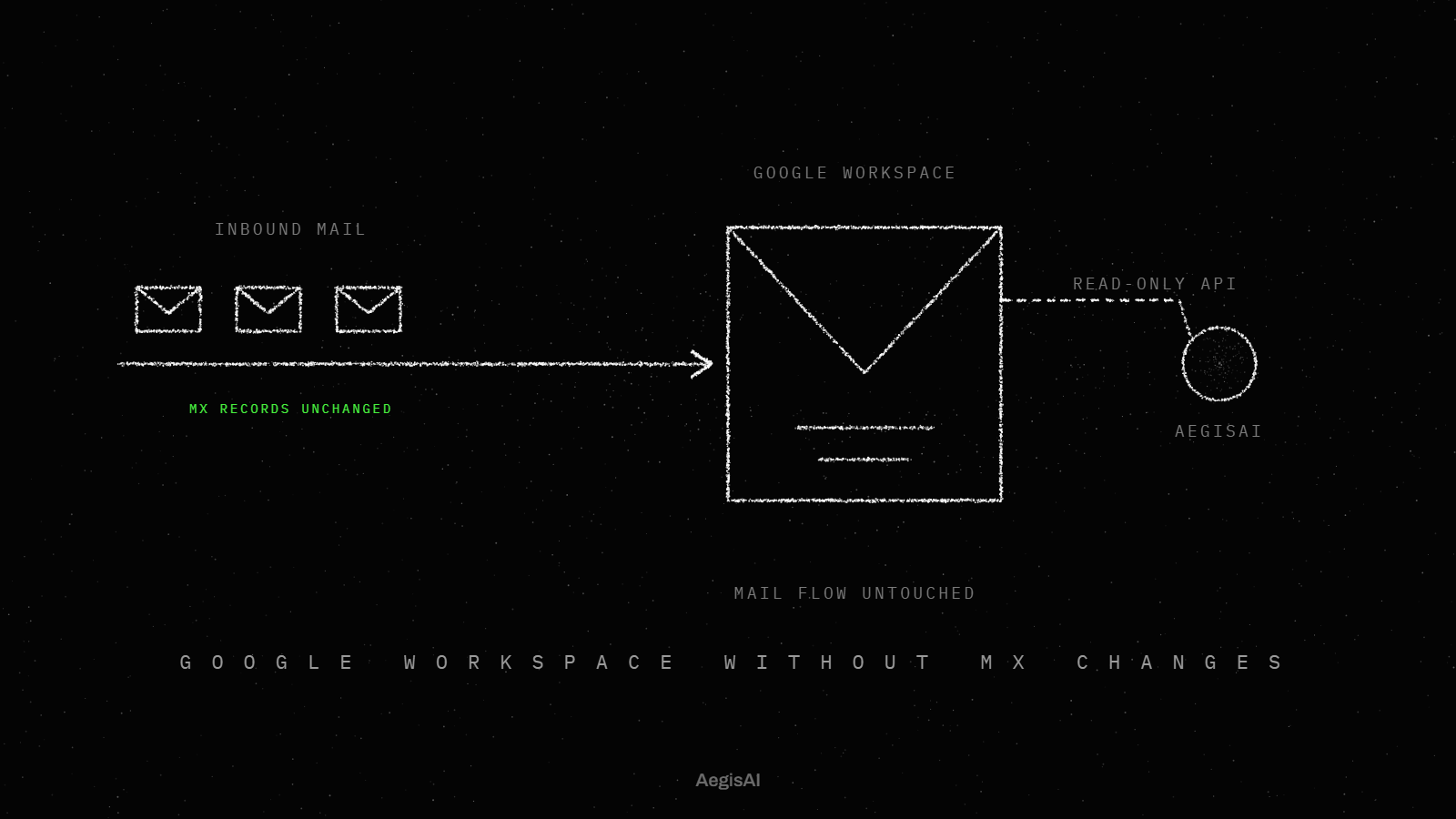
An API-based tool is an app inside your tenant, not a server in your mail path. Your MX record decides where mail goes. On Microsoft 365, updating the MX record sends all new email for your domain to Microsoft 365. On Google Workspace, the MX records are updated so email gets delivered to Google's mail servers20. An API tool leaves those records alone. It reads each message where it already sits, in the mailbox.
Microsoft describes the model directly. Some non-Microsoft services authenticate and use the Microsoft Graph API to scan messages after they are delivered to user mailboxes. The same access lets the service remove messages it believes to be malicious or unwanted. Here is the path of one message through that model.
An admin approves the app. On Microsoft 365, only an admin can consent to application permissions. On Google Workspace, an admin adds the app's OAuth scopes in domain-wide delegation, and Google says each scope should be appropriately narrow11.
The app asks to be told about new mail. On Microsoft 365 it creates a Microsoft Graph subscription, and an Outlook message subscription lasts at most 10,080 minutes, under seven days. On Gmail it calls the watch method, which must be called again at least every 7 days.
The platform receives and delivers the message as normal. The MX record still sends all new mail to Microsoft 365 or to Google's mail servers, and the platform's own filtering runs first.
The platform sends a change notification to the app. For an Outlook message, the average latency is under 1 minute and the maximum is 3 minutes.
The app reads the message through the API. With the Application Mail.Read role, it can read email in all mailboxes without a signed-in user.
The app reaches a verdict. Speed here is the vendor's own figure: AegisAI reports a median verdict of 1.9 seconds, and a convicted message is removed from every mailbox it reached within seconds3.
The app removes or moves the message through the same API. Removal is a write action, so the grant from step 1 must include it.
The app renews its subscription or watch before it expires, and the loop runs again for the next message.
Steps 2, 4 and 8 decide how fast the tool sees a message. Step 1 decides how much it can read and change. Step 6 is the only step a vendor controls on its own, so it is the step to measure on your own mail.
Ask each vendor to walk through these eight steps on your tenant, with its own figure for step 6.
The difference is where the tool sits when a message arrives. A gateway sits in front of the mailbox: the MX record points to it, so it receives the message before Microsoft 365 or Google does. An API tool sits behind the mailbox: the MX record keeps pointing to Microsoft 365 or Google, and the tool scans after delivery.
That one fact sets the rest of the trade.
The API-based or gateway email security page sets the two side by side for a buying decision.
Decide first whether you need a decision before delivery or removal after it.
It cannot stop a message before it reaches the mailbox. The API model scans after delivery, so there is always a window between delivery and removal. Five limits follow from the mechanism, and each one is set by Microsoft or Google, not by the vendor.
The first limit is the delivery window. Microsoft's own after-delivery control has the same shape. Zero-hour auto purge retroactively detects and neutralizes malicious phishing, spam or malware messages that were delivered to cloud mailboxes. Its search is limited to the last 48 hours of delivered email5. Measure the window on your own mail, from delivery time to removal time.
The second limit is the notification. The tool learns of a message from the platform, and the platform sets the pace: under 1 minute on average and 3 minutes at most for an Outlook message. A tool cannot act faster than it is told.
The third limit is renewal. A subscription that lapses fails quietly. Gmail stops sending updates for a user if the watch method is not called at least once every 7 days. An Outlook message subscription expires after at most 10,080 minutes, and a subscription with resource data lasts 1440 minutes. Ask how the tool detects a lapsed subscription and how it rescans the gap.
The fourth limit is the API budget. Outlook allows 10,000 API requests in a 10-minute period for each app ID and mailbox. The Gmail API allows 6,000 quota units per user per minute per project10. A burst of mail into one mailbox spends that budget fastest. Ask what the tool does when it is throttled.
The fifth limit is access. The Microsoft Graph integration typically requires full access to mailboxes. The Application Mail.Read role reaches all mailboxes. RBAC for Applications in Exchange Online can pair a grant with a resource scope that names the mailboxes. An unscoped Mail.Read grant from Entra plus a scoped one gives no effective resource scoping, so remove the unscoped grant.
The threat these limits bound is measured. In 2025, the FBI's Internet Crime Complaint Center recorded 24,768 business email compromise complaints with reported losses of $3,046,598,5582.
Write the delivery to removal window and the renewal check into your trial plan, with the throttling answer beside them.
Each row is a limit that Microsoft or Google sets for every app, with the question it raises for a vendor.
| Limit | Platform | What the platform states | What to ask the vendor |
|---|---|---|---|
| Who grants access | Microsoft 365 | Only an admin can consent to application permissions | Which permissions, and is each one application or delegated? |
| Mailbox reach | Microsoft 365 | Application Mail.Read reads email in all mailboxes without a signed-in user | Do you need every mailbox on day one? |
| Mailbox scope | Microsoft 365 | RBAC for Applications pairs a grant with a resource scope; an unscoped grant on top cancels it | Do you support a scoped grant, and have we removed the unscoped one? |
| Breadth of access | Microsoft 365 | Graph scanning after delivery typically requires full access to mailboxes | Which write rights does removal need? |
| Scope width | Google Workspace | Each scope in domain-wide delegation should be appropriately narrow | Send the exact OAuth scopes in writing |
| New mail signal | Microsoft 365 | An Outlook message subscription lasts at most 10,080 minutes | How do you monitor renewal? |
| Notification delay | Microsoft 365 | Under 1 minute on average, 3 minutes at most, for an Outlook message | What is your measured delivery to removal time? |
| New mail signal | Google Workspace | The watch method must be called at least every 7 days | What happens when a watch lapses? |
| API budget | Microsoft 365 | 10,000 requests in 10 minutes per app ID and mailbox | What do you do when throttled? |
| API budget | Google Workspace | 6,000 quota units per user per minute per project | What do you do when the quota runs out? |
| After-delivery reference | Microsoft 365 | Zero-hour auto purge searches the last 48 hours of delivered email | How far back do you rescan after a gap? |
Copy this table into your vendor questionnaire and get each answer in writing.
Judge an API-based tool on how it behaves in your tenant, not on whose name is on a list. Seven criteria cover the mechanism above.
The guide to evaluating API-based email security sets out a four-week trial sequence, from connection to decision. Run that sequence with these seven criteria as its scorecard.
Send the seven criteria to every vendor on your shortlist and score the written answers side by side.
Both are possible, because an API-first solution never needs the MX record. If a gateway already receives your mail, it delivers to Microsoft 365 or Google as before, and the API tool scans what lands in the mailbox. Nothing in mail flow changes.
Running both answers one question with your own data: what the API tool removes after the gateway has passed a message. That count is the gap the gateway leaves. Running the API tool alone answers a different question: whether detection after delivery, inside a notification window of under 1 minute on average, is enough for your risk. Moving off a gateway means changing the MX record back to Microsoft 365 or Google, which is a planned DNS change. The migration guide for replacing a secure email gateway covers that sequence.
Run the API tool next to your gateway first, and count what it removes before you change any DNS record.
Reads mail through the Microsoft 365 or Google Workspace API after delivery22. AegisAI investigates every email for what it is trying to do, and removes the ones that fail from every mailbox they reached21. No change to mail routing (MX records)23. Runs in monitoring mode first24.
A first month with an API-based tool should prove three things on your own mail: the tool sees every message, it notices a lapsed subscription, and it removes a bad message in a time you can measure.
Illustrative example, figures are fictional: Harbor Lane Clinics (fictional) has 140 people on Google Workspace and two IT staff. The admin adds the vendor's OAuth scopes in domain-wide delegation and records each scope with its approver and date in the change log. For two weeks the tool reads mail and acts on nothing. In week one, its log shows a six-hour gap for 12 mailboxes: the watch for those users had lapsed and no alert fired. The vendor renews the watches and rescans the gap, then adds an alert. In week three, removal is switched on for 30 mailboxes. The measured time from delivery to removal is 9 seconds at the median and 4 minutes at the slowest, during a burst of 2,000 marketing messages. The admin records both figures and gets the vendor's throttling answer in writing before rolling out to all 140 mailboxes.
Run the same first month on your own tenant, with the gap check in week one.
Track three numbers, each from a log you can export.
To see these three numbers on your own tenant, book a monitoring-mode walkthrough. Put them side by side on day 30 and decide on them.
They connect to Microsoft 365 or Google Workspace by API and scan mail after delivery, so the MX record stays as it is. AegisAI connects entirely through the Microsoft 365 and Google Workspace APIs. Compare any vendor on permissions, scope, renewal, throttling and removal.
No. It scans messages after they are delivered to user mailboxes. Microsoft's zero-hour auto purge also works after delivery, on the last 48 hours of delivered email.
On Microsoft 365, the change notification for an Outlook message arrives in under 1 minute on average and 3 minutes at most. Ask each vendor for its measured time from delivery to removal.
Microsoft says the Graph integration typically requires full access to mailboxes. Only an admin can consent to application permissions. On Google Workspace, each scope in domain-wide delegation should be appropriately narrow.
On Gmail, updates for a user stop if the watch method is not called at least once every 7 days. Ask how the tool alerts on a lapse and rescans the gap.
On Microsoft 365, yes. RBAC for Applications pairs the grant with a resource scope. Remove the unscoped Mail.Read grant from Entra too, or the scope has no effect.